

Think of cloud backup as your business's digital insurance policy. It’s a simple, secure, and automated way to copy your most important data to a remote server, keeping it safe from anything life throws at it—from local disasters and hardware failures to cyberattacks. When the worst happens, it's what lets you get back on your feet quickly and avoid expensive downtime.
Why Your Business Needs a Digital Vault

Picture a fireproof vault holding all your essential business files—invoices, customer information, project plans. Now, imagine that vault is digital, completely encrypted, and you can access it from anywhere, at any time. That's exactly what a good cloud backup solution provides.
For many small and medium-sized businesses in the UK, relying on older methods like external hard drives or a server in the corner of the office is a huge gamble. These devices are exposed to every possible risk: theft, hardware faults, fires, floods, and especially ransomware. A single incident could easily wipe out your live data and your only backup in one fell swoop.
From Local Risk to Cloud Resilience
Cloud backup completely changes the game. Instead of keeping all your eggs in one basket, it creates a secure off-site copy of your data.
Here’s how it works in a nutshell:
- Your data is first encrypted on your own systems, making it unreadable to anyone else.
- It's then securely sent over the internet to a specialist provider.
- Finally, it’s stored in highly secure, purpose-built data centres.
This process builds a critical "air gap" between your day-to-day operational data and your protected backups. If a cyberattack hits your local network, that separation is the lifeline that allows you to recover.
Staying Afloat in a Digital World
In today’s world, this isn’t just a nice-to-have IT feature; it's a fundamental business survival strategy. With cloud use in the UK now at 96% among organisations, sticking with outdated backup methods just doesn't make sense. It’s no surprise that 72% of IT leaders say the cloud has seriously improved their ability to recover from disasters.
For any UK business, a solid backup strategy is the bedrock of resilience. It's what separates a minor hiccup from a complete catastrophe, ensuring you can get back to serving your customers, no matter what.
Having a clear recovery plan is essential. You can see some practical disaster recovery plan examples to get a better idea of what's involved. It's also important to understand that cloud backup isn't the same as cloud storage. While storage is for live files you work on daily, backup is purely for recovery. We break down the differences in our article on cloud storage vs. local storage.
Ultimately, a cloud backup service transforms data protection from a manual, often-forgotten task into an automated and reliable safety net for your business.
The Real-World Benefits of Cloud Backup

Let's move past the technical jargon for a moment. What does cloud backup actually do for a UK business on a day-to-day basis? It's about swapping vague worries for solid resilience, giving you the confidence that your business can handle a crisis and keep running.
One of the most immediate wins is how it stands up to modern cyber threats. Picture this: a ransomware attack locks down your entire network. If your backups are sitting on a server in the same building, they're just as vulnerable as your live files. You could be left with nothing.
With cloud backup, your data is tucked away safely off-site. Even better, it can be made immutable, meaning it can’t be changed or deleted. An attacker who gets into your systems simply can't touch it. This simple feature transforms a business-ending disaster into a recoverable, though frustrating, incident.
Smarter Economics and Effortless Growth
For many small and medium-sized businesses, the financial side of cloud backup is a breath of fresh air. It gets you off the expensive treadmill of buying and maintaining your own backup hardware.
Instead of a hefty upfront capital expense (CapEx), you switch to a manageable operational expense (OpEx). This has some pretty clear advantages:
- No Hardware Costs: You don’t have to buy, maintain, or replace expensive on-site backup servers and drives.
- Predictable Budgeting: A straightforward monthly or annual subscription makes it easy to plan your IT spending.
- Pay for What You Use: As your business grows, your backup storage grows with you. No more guessing how much capacity you'll need in three years' time.
This frees up cash you can put back into what your business does best. You can explore more about the wider benefits of cloud computing for business in our detailed guide.
Drastically Reduced Downtime
When things go wrong, every minute you're offline costs you money and chips away at your reputation. Trying to restore everything from old-school tapes or external hard drives is often a slow, nail-biting process. Cloud backup, on the other hand, is built for speed.
A solid cloud backup strategy can slash your recovery times, minimise data loss, and get your team back on their feet far faster than traditional methods.
The impact is huge. Businesses that make the switch often report not only 30-40% savings but also 45% faster recovery times. That's a direct, measurable boost to your business continuity.
Simplified Compliance and UK Data Sovereignty
As a UK business, you know that data protection is more than just good practice—it's the law. Navigating regulations like the Data Protection Act can be a real headache, especially when it comes to where your data lives.
By choosing a UK-based provider for your cloud backup, you ensure your data physically stays within the country. This is known as data sovereignty, and it massively simplifies your compliance obligations. It gives you the peace of mind that you're meeting local legal standards—a critical factor for any business handling sensitive customer or financial data.
Choosing Your Cloud Backup Strategy
Deciding on a cloud backup solution isn’t just about picking a provider off a list. It's about building a strategy that fits your business like a glove. There's no one-size-fits-all answer here; the right choice depends entirely on your data, your budget, and how much control you need.
A fantastic place to start is with a time-tested principle: the 3-2-1 rule. It's a simple, powerful framework that’s been the bedrock of data resilience for years.
- Keep three copies of your data: the original, plus two backups.
- Store these on two different types of media (e.g., your server and a separate cloud service).
- Make sure one of those copies is kept off-site. This is your ace in the hole against local disasters like fire, flood, or theft.
Think of the 3-2-1 rule as your data's insurance policy. It builds in layers of protection so that no single point of failure can ever bring your business to a halt.
With that foundation in place, let's look at the different kinds of cloud environments you can use for that all-important off-site copy.
Public, Private, and Hybrid Clouds Explained
Choosing a cloud model is a bit like deciding where to store your company's most valuable assets. Each option offers a different blend of cost, control, and convenience.
Public Cloud: This is the model most people are familiar with. You're essentially renting secure storage space from a major provider like Amazon Web Services (AWS) or Microsoft Azure. It's like using a high-security storage facility – you get professional-grade protection and can easily add more space when you need it, all for a predictable monthly fee. The trade-off is that you're sharing the underlying infrastructure with other businesses.
Private Cloud: This is the complete opposite. You build and manage your very own dedicated cloud, either in your own office or at a private data centre. Think of it as owning a custom-built, private vault. You get total control and the highest level of security, but it comes with a much bigger price tag and requires significant in-house expertise to manage.
Hybrid Cloud: This approach cherry-picks the best of both worlds. You might use a private cloud for your most sensitive customer data but rely on a more affordable public cloud for everything else. It’s a flexible, balanced strategy that gives you tight security where you need it most, without breaking the bank.
To help you weigh the options, here’s a quick comparison:
Comparison of Cloud Backup Models for SMEs
| Backup Model | Typical Cost Structure | Best For Scalability | Level of Security Control | Ideal UK Business Scenario |
|---|---|---|---|---|
| Public Cloud | Pay-as-you-go, operational expense (OpEx) | Excellent – virtually unlimited | Managed by the provider, shared environment | A start-up or SME needing a cost-effective, scalable, and low-maintenance solution for general business data. |
| Private Cloud | High upfront capital expense (CapEx), plus ongoing maintenance | Limited by your hardware | Complete control over security protocols and access | A financial or legal firm with strict regulatory compliance needs and the budget/IT team to manage its own infrastructure. |
| Hybrid Cloud | A mix of CapEx and OpEx | Good – combines on-premise limits with public cloud flexibility | High for private elements, provider-managed for public elements | An established business that needs to keep highly sensitive data on-premise for compliance but wants to archive less critical data affordably in the cloud. |
Ultimately, the right model depends on your specific compliance, budget, and control requirements.
Full System vs. File-Level Backups
Once you've decided where your backups will live, you need to decide what you're backing up. Are you just protecting key documents, or do you need the ability to recover an entire server from scratch?
-
File-Level Backup: This is exactly what it sounds like – you select specific files and folders to copy. It's perfect for protecting user documents and is generally quicker and uses less storage. The downside is that restoring a whole system from just files is a slow, manual process.
-
Image-Level Backup: This takes a complete snapshot of a machine: the operating system, applications, settings, and every single file. If a server dies, you can restore the entire 'image' to new hardware and be back up and running in a fraction of the time. It's the go-to for business continuity.
-
Application-Aware Backup: This is a more intelligent type of backup designed for complex applications like databases (e.g., Microsoft SQL Server) or email platforms (e.g., Microsoft Exchange). It pauses the application momentarily to grab a perfectly consistent copy of the data, ensuring it can be restored without any corruption.
Most businesses use a mix of these. You might run a daily image-level backup on your critical servers while backing up user files more frequently. To really fine-tune your strategy and save on storage, you'll also want to understand the difference between how data is saved. Our guide explains how differential and incremental backups work in more detail.
Your Non-Negotiable Feature Checklist

When you start comparing cloud backup services, it's easy to get bogged down in technical jargon and slick marketing. So, let’s cut through the noise. Think of this as your essential shopping list – the features that aren't just 'nice to have', but are absolutely fundamental to protecting your business.
Focusing on these core capabilities will help you find a service that delivers genuine resilience, not just empty promises. Let's break down what really matters.
Rock-Solid Data Encryption
First up, and without question, is encryption. Your business data is your lifeblood, and it needs to be protected at every single stage of the backup process. You should not settle for anything less than AES-256 bit encryption.
This is the gold standard for security, the same level used by banks and governments around the world. A proper cloud backup service will apply this encryption in two critical places:
- In Transit: This shields your data as it travels from your network to the provider's cloud servers, stopping anyone from snooping on it along the way.
- At Rest: This keeps your data securely scrambled and unreadable while it's being stored in the data centre.
Imagine putting your documents in a locked safe before they even leave your office, then moving that safe in an armoured van to an even more secure vault. That’s what proper encryption does for your data.
Flexible and Clear Retention Policies
How long do you actually need to keep your backups? A week? A month? Or maybe seven years for compliance reasons? Your cloud backup provider must give you total control over this.
A data retention policy is simply the set of rules that determines how long different versions of your files are kept before they're deleted. A good service will let you get specific, perhaps keeping daily backups for a month, monthly backups for a year, and annual backups for even longer. This kind of flexibility is crucial for managing your storage costs while ticking all your legal and operational boxes.
Choosing a solution with customisable retention is non-negotiable. It lets you match your backup plan to your specific business and compliance needs, ensuring you don't pay to store data you no longer need.
Smart Storage-Saving Technologies
As your business data grows, so do your storage costs. This is where clever technology like deduplication comes into play.
Deduplication is a seriously smart process. It scans your data and only backs up the unique bits. For example, if ten of your staff all have the same 10MB company presentation on their laptops, a basic system would chew up 100MB of storage. With deduplication, the system is clever enough to store that 10MB file just once and create ten little pointers to it. Just like that, you've saved 90MB of space.
This all happens quietly in the background, but it can massively reduce the amount of storage you need, which means lower monthly bills. It’s a must-have for any business wanting an efficient, cost-effective backup solution.
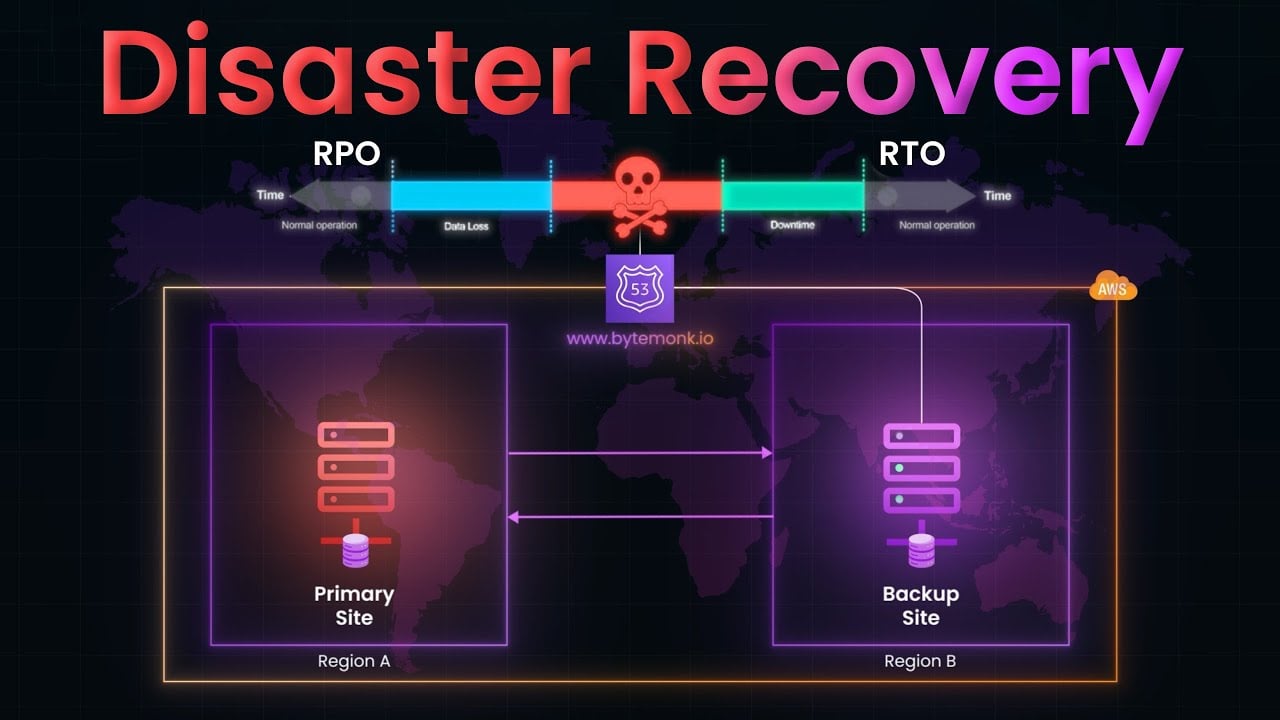
Understanding RPO and RTO
These two acronyms are probably the most important concepts when we talk about business continuity. Getting your head around them is central to building a backup strategy that actually works when you need it.
-
Recovery Point Objective (RPO): This answers the question, "How much data can we stand to lose?" If your RPO is one hour, it means you need your data backed up at least every hour. That way, if disaster strikes, you'll lose an hour's worth of work at most.
-
Recovery Time Objective (RTO): This answers the question, "How quickly do we need to be back in business?" An RTO of four hours means your systems, applications, and data must be fully restored and working within four hours of an incident.
Defining your RPO and RTO allows you to have a much clearer conversation with potential providers. You can ask them straight out, "Can your service meet our RPO of 15 minutes and our RTO of two hours?" This shifts the discussion from vague features to concrete, measurable outcomes that protect your bottom line.
With ransomware attacks becoming more common, a fast recovery is everything. Most victims now get back on their feet without paying the ransom, precisely because they have clean, isolated cloud backups to fall back on. This resilience is vital, especially when UK data breach costs have hit an average of £4.2 million. A fast, reliable recovery plan has never been more important. You can dig deeper into the role of modern backups in the latest State of Cloud Backup report.
Staying Secure and Compliant
For any UK business, protecting customer data and meeting legal standards isn’t just good practice—it's non-negotiable. When you’re looking at cloud backup services, security and compliance need to be right at the top of your list. It’s what gives you the confidence that your data, and your reputation, are properly protected.
A huge piece of this puzzle is UK data residency. In simple terms, this means your backed-up data is physically stored on servers located within the United Kingdom. Keeping your data on home soil is often critical for complying with the Data Protection Act and GDPR, which makes your life a lot easier.
When your data never leaves the country, you sidestep the headache of navigating complex international data transfer laws. It just makes audits and regulatory checks far more straightforward.
Building a Modern Fortress Against Cyber Threats
Let’s be honest, today’s cyber threats are relentless, especially ransomware. A modern cloud backup service is your last line of defence, built specifically to withstand a breach. A key idea here is the "zero trust" security model, which works on a simple but powerful principle: "never trust, always verify."
What this means in practice is that your backup data is ring-fenced in a highly restricted environment. Even if a hacker manages to get into your main network, they can’t just waltz over and delete or tamper with your backups. This defence is bolstered by two critical features:
- Immutable Backups: Think of these as a ‘write-once, read-many’ copy of your data. Once a backup is saved, it can’t be changed or deleted for a fixed period—not even by someone with admin rights. This makes it completely resistant to ransomware that tries to encrypt your backup files.
- Air-Gapped Storage: This creates a virtual gap between your live systems and your backup storage. It’s like a digital drawbridge that’s only lowered for the brief moment a backup is taking place, making it impossible for an infection on your network to spread across.
For total protection, it's wise to consider integrated data backup and disaster recovery solutions as a key component of cybersecurity. This approach treats your backups not just as an afterthought for recovery, but as a proactive and vital part of your entire security strategy.
Meeting Industry-Specific Regulations
On top of general data protection laws, many industries have their own stringent compliance rules. Whether you’re in finance, healthcare, or law, the right cloud backup solution helps you meet these obligations without the stress.
A compliant backup service isn't just about ticking boxes; it's about demonstrating to your clients and regulators that you take data stewardship seriously. It builds trust and protects your business from potentially severe penalties.
Providers who focus on UK businesses get this. They can offer solutions designed to meet specific industry standards out of the box, providing detailed audit trails and reports to prove you’re compliant. This frees you up to focus on running your business, knowing your data protection is solid and legally sound. For a deeper dive, check out our article on cloud security best practices.
Your Step-by-Step Implementation Roadmap
Moving from knowing what you should do to actually doing it can feel like a big jump. But putting a solid cloud backup solution in place is much simpler when you break it down into a few common-sense steps. This roadmap is designed to walk you through it, taking the guesswork out of the process so you can build a data protection strategy that just works.
Try not to see this as a technical headache. Think of it as laying a crucial part of your business's foundation—one that lets you stay in control, no matter what happens.
Step 1: Audit Your Data and Define Your Goals
Before you can protect anything, you need a clear picture of what you've got. The first thing to do is a proper data audit. Figure out where all your essential information is stored—from financial records tucked away on the main server to project files scattered across team laptops. Not all data has the same value, so it’s vital to classify it based on how important it is to keep the business running.
With that done, it's time to get brutally honest about your Recovery Point Objective (RPO) and Recovery Time Objective (RTO). Answering these two questions is the most important part of this entire process:
- How much data can we realistically afford to lose? This defines your RPO and tells you how often you need to back up.
- How quickly do we absolutely need to be back up and running? This sets your RTO and determines the technology you'll need to restore everything.
Clear answers here will shape every single decision you make from this point on, from the provider you choose to the backup schedules you set.
Step 2: Calculate Needs and Choose a Partner
Now that you know your goals, you can work out the technical details. Add up the total amount of data you need to back up right now, and have a sensible guess at how much it might grow over the next year or so. This number is a key factor in how much you'll pay and what kind of plan you’ll need.
This is the point where you start looking at potential partners. You'll want a provider with a strong UK presence to make life easier with compliance. It often makes sense to work with a managed service provider like HGC IT Solutions. They don't just sell you the software; they bring the expertise to manage it all for you. It turns a complex IT project into a simple, reliable service you don't have to worry about.
Step 3: Configure Your First Backup Jobs
Once you've got your partner and solution sorted, it's time to get things set up. Your provider should help you install the necessary software on your servers and computers. Your first real task is to configure the backup jobs based on the priorities you identified in your data audit.
For example, your critical finance server might get a full image-level backup every four hours (a very low RPO). On the other hand, less urgent marketing files might only need a file-level backup once a day. This is where your plan comes to life, making sure your most important data gets the best protection.
The diagram below shows the basic security flow that keeps your data safe at every stage.

This simple three-step process—encrypting data on your end, storing it securely in the UK, and keeping it isolated from threats—is the bedrock of any resilient backup strategy.
Step 4: Run a Test Restore
This is the final step, and it's the one that businesses forget all the time. But honestly, it’s the most important. A backup you haven't tested isn't a backup; it's just a hope. You must perform a test restore to prove that your data isn't just being saved, but that you can actually get it back.
A backup plan isn't complete until you've successfully restored data from it. Regular testing turns your strategy from a theoretical exercise into a proven, reliable recovery mechanism.
Start small. Try restoring a single file or a folder. Later, you can schedule a bigger test, like recovering an entire virtual machine. By documenting the process and running these tests every quarter, you’ll gain real peace of mind, knowing that if you ever need your backups, they’ll be ready and waiting for you.
Common Questions About Cloud Backup
Even with a solid plan, it’s natural to have a few questions when you’re looking at new technology for your business. To help clear things up, we've tackled some of the most common queries we hear from UK business owners about cloud backup.
Is Cloud Backup Really More Secure Than Keeping Backups On-Site?
For the vast majority of small and medium-sized businesses, the answer is a resounding yes. Think about it: specialist cloud providers have security budgets and teams of experts that most SMEs simply can't match. They've got 24/7 monitoring, sophisticated threat detection, and serious physical security at their data centres.
But the biggest advantage? Storing your data off-site protects you from localised disasters. A fire, a burst pipe, or even a break-in could destroy your main systems and your on-site backups in one fell swoop. Your cloud copy, however, would be completely safe and sound, tucked away in a different location.
How Much Should We Expect to Pay?
The costs are incredibly flexible, which is great for budgeting. Most services run on a pay-as-you-go model, turning a chunky capital expense into a predictable operational cost. The final price usually boils down to three main things:
- Data Volume: How many gigabytes or terabytes you need to store.
- System Count: The number of laptops, PCs, and servers you’re backing up.
- Retention Period: How long you need to hang on to your backup copies.
This almost always works out cheaper than buying, powering, and eventually replacing the expensive servers and drives needed for a decent in-house backup system. One pro tip: always ask a potential provider about any fees for retrieving your data, so there are no nasty surprises down the line.
The most common mistake is confusing cloud backup with cloud storage. They serve completely different purposes. Cloud storage is for collaboration, while cloud backup is for disaster recovery.
This is a crucial point that catches a lot of people out. Services like Google Drive or Dropbox are fantastic for sharing and working on live files. But they aren't true backup solutions. If you accidentally delete a file from your computer, it often gets deleted from your cloud storage, too.
Cloud backup is different. It’s a dedicated data protection service. It creates independent, versioned copies of your data specifically so you can restore everything after a disaster. That’s a job cloud storage just wasn't built to do.
Ready to implement a robust, secure, and compliant cloud backup strategy? The expert team at HGC IT Solutions can design and manage a solution that fits your business perfectly, giving you complete peace of mind. Learn more about our IT solutions.
