
Ever heard the term RAID and wondered what it was all about? At its heart, a RAID – which stands for Redundant Array of Independent Disks – is a clever way to get multiple physical hard drives to work together as a single team.
This teamwork can supercharge your system's speed, give you a safety net against data loss, or even do both at the same time. It's a cornerstone technology for keeping a business running smoothly, especially when a single drive decides to fail.
Unlocking Data Protection with Hard Drive RAIDs
Think of your critical business data as a high-performance racing car. If you get a single flat tyre (a failed hard drive), the whole operation grinds to a halt. That’s a disaster in the making, costing you precious time and money.
Now, imagine that same car has a professional pit crew. When a tyre fails, they work in perfect sync to swap it out in seconds, keeping the car in the race. That's exactly what a hard drive RAID does for your data.
Instead of putting all your trust in one drive, a RAID setup spreads the workload and the data across a whole team of them. This simple but powerful idea helps achieve two goals that are absolutely vital for any modern business:
- Better Performance: By spreading data across multiple disks, your computer can read and write information much faster. It's a bit like having several people unload a van instead of just one – the job gets done a lot quicker.
- Fault Tolerance: This is the big one. If one hard drive in the array gives up the ghost, the others can pick up the slack. Depending on how you've set it up, your system can carry on as if nothing happened, giving you the time you need to swap out the broken drive without losing a single byte of data.
Why UK Businesses are Turning to RAID
For small and medium-sized businesses, just having data isn't enough; you have to manage it properly. With the constant threat of cyber attacks and the sheer volume of information we all handle, a solid storage strategy is no longer a 'nice to have'.
Across the UK, RAID adoption has shot up, partly because of strict data protection laws like the UK GDPR. In fact, Europe (with the UK leading the charge) makes up about 24% of the global RAID controller market. Digging deeper, it turns out that around 38% of small UK businesses are already using RAID to keep their data safe and accessible. You can see more of these market trends on Reanin.com.
Think of a RAID system as your first line of defence against hardware failure. It's not just about getting more storage space; it's about keeping your business running and protecting your most valuable digital assets when a drive inevitably fails.
Understanding how RAID fits into your overall data strategy is a key part of building operational resilience. It’s a strategic investment in your company’s stability, turning a common technical problem like a drive failure into a minor inconvenience instead of a major disaster.
For businesses looking to build a truly reliable IT foundation, exploring a managed IT infrastructure can offer the expert guidance needed to get these systems designed and implemented the right way from day one.
Breaking Down The Most Common RAID Levels
Deciding to use a RAID setup is a great first step, but it’s not a one-size-fits-all solution. The different configurations, known as RAID levels, each strike a different balance between speed, data protection, and cost. Getting your head around these trade-offs is key to picking the right setup for your business.
A good analogy is choosing a vehicle. A sports car is built for pure speed but offers very little in the way of cargo space or safety. A security van, on the other hand, puts protection far ahead of performance. Each RAID level is designed with a similar specific purpose in mind, from all-out speed to bulletproof data safety.
To put it simply, let's look at how a UK business might weigh up the risks. This flowchart illustrates the basic choice between sticking with a single drive or upgrading to a RAID system to protect critical data.

The takeaway here is pretty clear: when losing your data would seriously disrupt your operations, moving to a server with a RAID configuration isn't just a good idea—it's essential for business continuity.
RAID 0: All About Speed
RAID 0 is built for one thing: performance. It takes at least two drives and combines them into one giant, super-fast volume. It works by "striping" data, which means it breaks files into chunks and writes them across all the drives at the same time.
Imagine unloading a large delivery van. Instead of one person carrying boxes one by one, you have two people working in parallel. The job gets done in half the time. That’s the principle behind RAID 0.
- Key Benefit: Fantastic read and write speeds.
- Major Drawback: Zero redundancy. If one drive fails, all data on all drives is lost. It’s a total wipeout.
Because of this risk, you’ll typically only find RAID 0 used where speed is everything and the data itself is disposable, like on a video editor's scratch disk or for temporary data processing. It’s the definition of a high-risk, high-reward setup.
RAID 1: Simple, Solid Redundancy
RAID 1 takes the opposite approach. It’s all about protecting your data through a technique called "mirroring." You’ll need a minimum of two drives, but instead of splitting data for speed, it creates an exact, real-time copy. Anything written to the first drive is instantly duplicated on the second.
Think of it like having a perfect photocopy of your most important documents stored in a separate, identical filing cabinet. If the first cabinet goes up in flames, you have a complete, ready-to-use copy waiting for you.
- Key Benefit: Excellent data protection and incredibly simple recovery. If one drive dies, the other one just keeps working, with zero data loss.
- Major Drawback: You pay for storage you can't use. With two 4TB drives, you only get 4TB of usable space, as the other is a mirror.
This makes RAID 1 perfect for small business servers or any machine holding critical files where uptime and data safety are far more important than raw speed or maximising storage capacity.
RAID 1 provides a direct and simple form of fault tolerance. It ensures that a single drive failure doesn't lead to downtime, making it a reliable choice for protecting vital operating systems or small databases.
RAID 5: The Balanced All-Rounder
RAID 5 is often the go-to because it strikes a great balance between performance, storage efficiency, and data protection. It requires at least three drives and uses a clever method called "parity" for redundancy. It stripes data across the drives like RAID 0 for speed, but it also calculates and stores parity information.
Parity is a bit like a simple maths puzzle. If you know that 2 + 5 = 7, and you later lose the number 5, you can easily figure out what’s missing by looking at the 2 and the 7. RAID 5's parity works in a similar way, allowing it to rebuild data from a failed drive using the information left on the others.
- Key Benefit: Good read speeds and efficient storage use, all while protecting you from a single drive failure.
- Major Drawback: Writing data can be a bit slower because of the parity calculation. The array is also vulnerable if another drive fails during a rebuild.
You'll find RAID 5 in countless general-purpose file and application servers where a solid mix of speed, capacity, and safety is needed.
RAID 6: Enhanced Protection
RAID 6 builds on the concept of RAID 5 but adds an extra layer of security. It requires a minimum of four drives and calculates two independent sets of parity data. The big advantage? It can survive the failure of up to two separate drives with no data loss whatsoever.
This is like having two different maths puzzles to solve for the same missing number. If one puzzle gets corrupted, you still have the other one to fall back on. This dual parity makes RAID 6 much more resilient than RAID 5, which is especially comforting during the long and stressful process of a drive rebuild. The type of hard drives you use matters too; you can explore the differences in our guide comparing SATA vs SAS drives for business use.
RAID 10: The Best of Both Worlds
Finally, we have RAID 10 (often called RAID 1+0), which combines the raw speed of RAID 0 with the rock-solid redundancy of RAID 1. It needs at least four drives to work. The setup involves creating two mirrored pairs (RAID 1) and then striping data across those pairs (RAID 0).
The result is a system that gives you the instant data duplication of mirroring alongside the high-speed access of striping. It’s often seen as the gold standard for high-performance systems that absolutely cannot afford downtime, like busy database servers or critical enterprise applications.
- Key Benefit: Extremely high performance and fantastic redundancy.
- Major Drawback: It's expensive. You immediately lose 50% of your total drive capacity just for the mirroring.
RAID Level Comparison at a Glance
With all these options, it can be tough to keep them straight. This table offers a quick comparison of the most common RAID levels to help you find the best fit for your business needs.
| RAID Level | Minimum Drives | Key Benefit | Primary Drawback | Ideal Use Case |
|---|---|---|---|---|
| RAID 0 | 2 | Maximum Speed | No Fault Tolerance | Video Editing, Temporary Caching |
| RAID 1 | 2 | High Redundancy | Inefficient Storage (50% Loss) | Operating System Drives, Small Servers |
| RAID 5 | 3 | Balanced Speed & Redundancy | Slow Writes, Rebuild Vulnerability | General File & Application Servers |
| RAID 6 | 4 | Dual Drive Failure Protection | Slower Writes than RAID 5 | Large Archives, Data Warehousing |
| RAID 10 | 4 | High Speed & High Redundancy | High Cost (50% Storage Loss) | Database Servers, Mission-Critical Apps |
Ultimately, choosing the right RAID level comes down to matching the technology to your business reality—balancing your budget against your tolerance for risk and downtime.
Choosing Between Hardware RAID and Software RAID
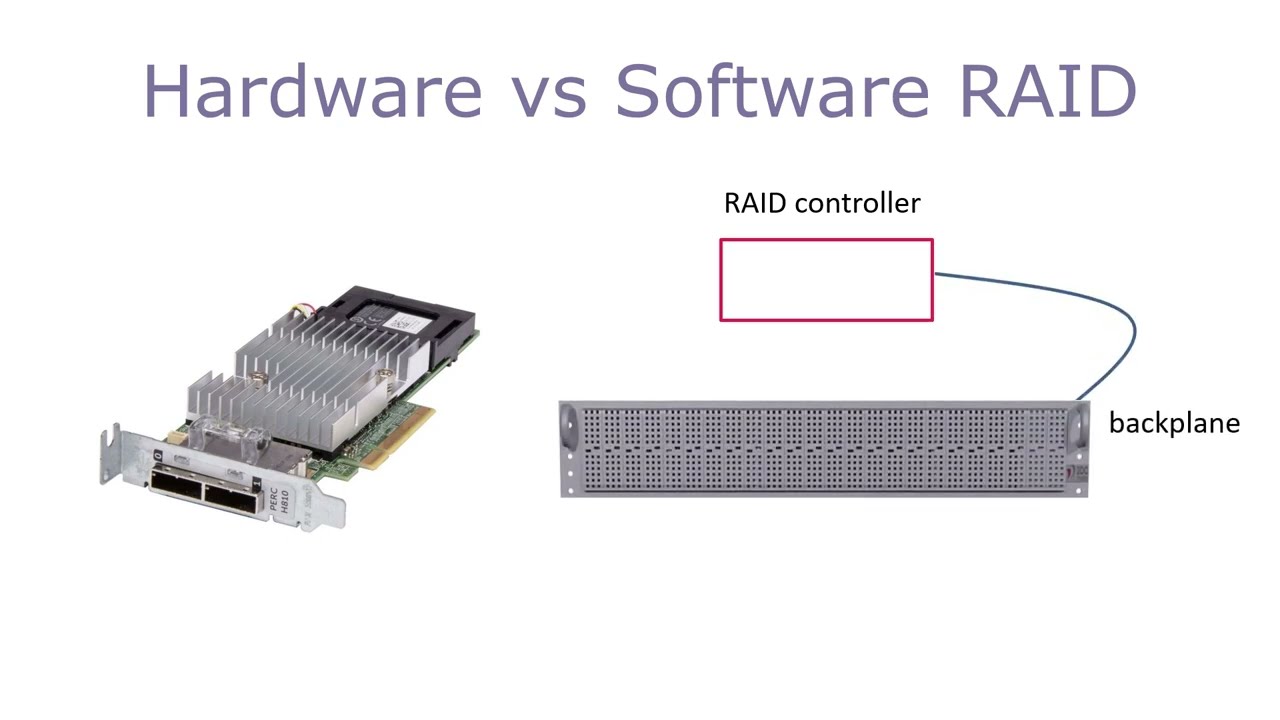
Once you’ve settled on the right RAID level for your business, you’ve got another big decision to make: how will you manage it? This really comes down to two paths: hardware RAID or software RAID. Each has its pros and cons, and the best choice for you hinges on your budget, performance needs, and technical setup.
Think of it this way. Imagine you have a complex project that needs managing. Do you hire a dedicated, specialist project manager, or do you ask an already busy employee to add it to their to-do list? The specialist will probably get the job done faster and more efficiently, but they’ll cost more. Asking your existing employee is the cheaper option, but their other duties might take a hit as they juggle the extra workload.
This is a great way to understand the core difference. Hardware RAID is your specialist, and software RAID is your existing employee taking on a new task.
Understanding Hardware RAID
A hardware RAID setup involves a dedicated controller card that you install inside your server. This card is like a mini-computer with its own processor and memory, built to do just one thing: manage your hard drive raids flawlessly.
Because it handles all the heavy lifting—the complex calculations for striping and parity—it doesn't put any extra strain on your server's main processor (CPU). This means your CPU is free to focus on what it does best, like running your applications, databases, and operating system.
This dedicated processing power translates directly into better performance, especially with more demanding setups like RAID 5 or RAID 6. What's more, many hardware RAID cards come with a battery backup unit (BBU). This little battery protects any data that's being written to the disks if the power suddenly cuts out, giving you an extra layer of protection that software RAID just can't offer.
Exploring Software RAID
Software RAID, as the name implies, uses software to manage the disk array. In most cases, this capability is already built right into your operating system, whether that's Windows, macOS, or Linux. It relies on your system’s existing CPU and memory to do all the RAID-related work.
The biggest plus here is the cost. Since the feature is already part of the OS, there’s no extra hardware to buy. This makes it a fantastic option for small businesses or even home users who need simple redundancy, like a basic RAID 1 mirror, without a big initial investment.
But that cost-saving comes at a price: performance. The more complex your RAID level, the more of your CPU's power it will chew up. This might not be a big deal for a simple file server, but for a busy database or a high-traffic application server, it could lead to a noticeable slowdown across the board.
Key Factors for Your Decision
In professional environments, there's a strong preference for dedicated hardware. In fact, hardware RAID cards captured a 65% market share, with UK SMBs accounting for about 15% of the over 500,000 units shipped globally. This demand is often pushed by performance-hungry sectors like the internet industry, which holds a 30% application share for RAID setups. You can dig deeper into these figures by checking out the RAID market trends from Global Market Statistics.
To help you make the right call, here’s a quick breakdown:
- Performance: If you're running demanding applications or simply need the fastest speeds possible, hardware RAID is the clear winner.
- Cost: For budget-conscious setups where top-tier performance isn't the main priority, software RAID is a perfectly sensible and affordable solution.
- Reliability: With its dedicated components and features like battery backups, hardware RAID generally offers more robust protection against unexpected outages.
- Simplicity: Software RAID is often easier to configure for beginners, as the controls are integrated right into the operating system you're already familiar with.
The Reality of a RAID Drive Failure and Rebuild

While a solid RAID setup gives you a brilliant safety net, it's a huge mistake to think you can just "set it and forget it." Hard drives are physical, mechanical things. They wear out. Sooner or later, one will fail—it's a matter of when, not if. Knowing what to expect when that day comes is the key to handling it without panic or losing a single byte of data.
When a drive in your RAID array gives up, the system will almost certainly let you know. You might see a physical warning, like an angry blinking light on the server, or get a software alert pinging your email. That alert is your call to action.
The system will carry on working in what’s called a degraded state. Everything is still running and your data is accessible, but your protection is gone. Think of it like driving on a spare tyre; you’re still moving, but you’ve lost your backup and the situation has become much riskier.
The Rebuild Process Step-by-Step
Once you’ve spotted the failed drive, the recovery process—known as a rebuild—can begin. It’s a straightforward but delicate operation that gets your array’s fault tolerance back in place.
- Get a Replacement: First things first, you need a new drive. It’s always best to get an identical replacement—same model, size, and even firmware version if possible—to sidestep any compatibility headaches.
- Do a Hot Swap: Most modern servers support "hot-swapping," a fancy term for pulling out the dead drive and slotting in the new one while the system is still powered on. No downtime needed.
- Kick Off the Rebuild: As soon as the new drive is in, the RAID controller gets to work. It uses the parity data spread across the other healthy drives to painstakingly recreate all the missing information on the new disk, bit by bit.
This rebuild isn’t instant. For large hard drive raids, it can be a long process, sometimes taking hours or even days depending on how big the drives are and how busy the system is.
The Danger Zone During a Rebuild
That rebuild window is the single most vulnerable moment for your RAID array. While the system is working hard to restore its protection, it's under enormous stress. Every other drive in the array is being read from constantly, and that intense workload can be the final straw for another older, already-strained drive.
The biggest risk during a rebuild is a second drive failure. In a RAID 5 array, if another drive fails at this point, it’s game over—all your data is gone. This is exactly why RAID 6, which can handle two drive failures, is so often recommended for larger, more critical systems.
This period of high risk is precisely why you need to keep a close eye on your drives. Catching the early warning signs of a drive's health starting to decline means you can replace it before it fails, avoiding the high-stakes pressure of a degraded array altogether. If you're not watching, you're just gambling with your data.
Why Professional Management Makes All the Difference
Dealing with a drive failure and the whole rebuild process requires a clear, calm plan. For a busy business owner, that blinking red light can be a seriously stressful distraction. Do you have a spare drive ready to go? Do you know the exact steps for your particular server?
This is where professional oversight is worth its weight in gold. A managed IT service provider keeps an eye on the health of your hard drive raids 24/7. They're alerted to problems long before they become emergencies, which allows for planned, non-disruptive maintenance.
And if a drive does fail, having a partner means the entire headache is handled for you, from sourcing the right replacement to managing the rebuild. This proactive approach is a cornerstone of any good business continuity strategy. If you're wondering how this fits into your bigger picture, understanding the basics of a solid IT disaster recovery plan provides vital context for protecting your whole business. At the end of the day, managing RAID isn't just about swapping hardware—it's about safeguarding your company's future.
Why RAID Is Not a Substitute for Backups
This is probably the single most dangerous misconception about RAID: the belief that because you have multiple drives, your data is automatically backed up. It’s an easy mistake to make, but it’s one that leaves your business completely exposed to some of the most common forms of data loss.
Let's be crystal clear. RAID is a technology built for high availability and uptime. Its whole purpose is to keep your systems online and working even when a physical hard drive fails. It is not, and was never designed to be, a backup solution.
Think of it this way: RAID is like having a spare tyre in your car. It’s fantastic for getting you moving again after a puncture, saving you from being stranded on the side of the road. But that spare tyre is utterly useless if the entire car gets stolen or written off in an accident. A RAID array functions on the same principle – it’s there to handle a very specific hardware failure, not a full-blown data disaster.
Scenarios Where RAID Offers No Protection
To really hammer this point home, let’s look at a few real-world situations where even the most sophisticated RAID 10 setup would offer zero protection:
- Accidental Deletion: An employee drags a critical project folder to the recycle bin and empties it. The RAID system doesn't know it was a mistake; it just follows instructions, faithfully deleting that folder across every drive in the array. The data is gone.
- Ransomware Attack: A nasty piece of malware gets into your network and starts encrypting your files. It doesn't care about your hardware setup. It encrypts the data at the file system level, and your RAID controller diligently writes that newly encrypted, useless data across all its disks.
- Software Corruption: A botched software update or a nasty bug corrupts your main database. That corrupted data is now the 'live' version, and it gets perfectly mirrored or striped across your entire array.
- Physical Disaster: A fire, flood, or even theft at your office is the ultimate leveller. If the server is destroyed or stolen, the entire RAID array goes with it.
The bottom line is this: RAID protects you from a broken piece of hardware. A backup protects you from losing the data itself. The two are not interchangeable; they solve completely different problems.
The 3-2-1 Rule: A Data Protection Standard
This is why anyone serious about protecting their data follows the industry-standard 3-2-1 backup rule. It’s a beautifully simple but powerful strategy that ensures your business can recover from almost anything.
Here's how it works. You should always have:
- Three complete copies of your data.
- On two different types of storage media.
- With one of those copies kept safely off-site.
Your live RAID system can count as your first copy. The second might be a local backup on a separate device, but the third—the off-site copy—is the crucial one. This is where modern cloud backup solutions for business come into play, providing that essential off-site protection automatically.
In the UK, where we know human error is a major factor in data breaches, this layered approach is vital. While RAID's fault tolerance is brilliant for keeping the lights on, pairing it with a proper 3-2-1 backup strategy can slash the risk of permanent data loss by over 60%. You can explore more about the market impact of RAID implementations on Global Market Statistics. Relying on RAID alone is like having a car with seatbelts but no brakes—you’re ignoring a fundamental and critical piece of safety equipment.
Implementing a Smart RAID Strategy for Your Business

Alright, let's move from theory to practice. Putting the right RAID strategy in place means making a few key decisions that really fit your business—your budget, your daily operations, and how much risk you're comfortable with.
It all starts with picking the right RAID level. Are you after the sheer speed of RAID 0 for something like video editing scratch disks? Or the simple, foolproof mirroring of RAID 1 for your critical operating system drives? Maybe you need the balanced performance and protection of RAID 5 or RAID 6 for the main company server. Each has its place.
Assembling Your Storage Foundation
Once you’ve settled on a RAID level, you need to decide between hardware and software RAID. A dedicated hardware RAID card will always give you better performance and often comes with handy features like a battery backup, which is a lifesaver in a power cut. It's the go-to for demanding setups. On the other hand, software RAID is built right into most operating systems, making it a budget-friendly choice that’s perfectly fine for less critical tasks.
This is crucial: your RAID array is not a backup. It needs to be part of a proper backup plan, like the 3-2-1 rule. Remember, hard drive raids protect you if a physical disk dies. They do nothing to save you from accidental deletion, file corruption, or a ransomware attack. RAID and backups are a team; one can't replace the other.
A well-designed RAID strategy is more than just hardware; it's a core component of your business continuity plan. It ensures that a common technical issue like a drive failure becomes a manageable event rather than a catastrophic one.
The Value of a Managed IT Partner
For many UK businesses, trying to manage all this in-house is a real headache. That's where a managed IT partner like HGC IT Solutions can make all the difference. Instead of waiting for a drive to fail and scrambling to fix it, we offer proactive monitoring to spot potential problems before they ever lead to downtime.
This approach gives you access to robust RAID technology without needing your own dedicated IT team. As businesses in the UK create more and more data, having an efficient storage system isn't a luxury—it's essential. A solid RAID setup can slash the cost of downtime, which can run into thousands of pounds per minute for small and medium-sized businesses. You can learn more about the market impact of RAID on DataIntelo.
A good partner handles the entire process for you. We’ll start with a consultation to figure out what you need, handle the complete setup and configuration, and then provide ongoing maintenance and rapid support if anything goes wrong. This ensures your data is protected today and that your storage can grow with your business tomorrow.
Ready to design a storage solution that actually works for you? Let's talk.
Your Top Questions About RAID, Answered
When you get down to the practicalities of setting up or maintaining a RAID system, a lot of questions tend to pop up. Here are some quick, straightforward answers to the things we get asked most often by business owners.
Can I Mix and Match Different Hard Drive Sizes?
Technically, you sometimes can, but you really, really shouldn't. It’s a classic case of a chain being only as strong as its weakest link.
If you mix drive sizes, the RAID controller will look at all the drives and treat them all as if they were the size of the smallest drive in the set. Imagine putting one 1TB drive in with three 2TB drives. The system will only use 1TB from each of those bigger drives, meaning you've just thrown away 3TB of storage you paid for.
For a stable, reliable array that gives you the performance and capacity you expect, stick to identical drives. Same brand, same model, same size. No exceptions.
How Long Does a RAID Rebuild Actually Take?
This is the big "how long is a piece of string?" question. A rebuild can be over in a few hours or, in some cases, drag on for days. It all comes down to a few key things:
- Drive Size: A massive 16TB drive will take a lot longer to rebuild than a 2TB one.
- RAID Level: The more complex the setup (like RAID 6), the more work the system has to do.
- System Load: Is the server still being hammered by users while it's rebuilding? If so, expect the process to slow to a crawl.
As a rule of thumb, a multi-terabyte array that's actively in use could easily take 24 hours or more to finish rebuilding. Remember, during that entire time, your system is vulnerable. A second drive failure before the rebuild is complete could mean total data loss.
Do I Still Need RAID with SSDs and Cloud Storage Around?
Yes, without a doubt. RAID isn't just for old-school spinning hard drives; it works brilliantly with modern Solid State Drives (SSDs). An all-SSD RAID array can give you breathtaking speed combined with that all-important redundancy for your most critical applications.
And what about the cloud? Well, what do you think giants like Amazon Web Services and Microsoft Azure are using to keep your data safe? They rely on incredibly sophisticated, massive-scale versions of RAID to ensure the data you store with them doesn't just vanish.
For any server you have running in your own office, a RAID setup is still the bedrock of keeping your business online and your data available.
Ready to build a storage solution that gives you both performance and peace of mind? The experts at HGC IT Solutions can help you design, set up, and manage the right RAID and backup strategy for your business. Get in touch today for a friendly chat.
