
A Configuration Management Database (CMDB) is, at its core, a dynamic digital blueprint of your company's entire IT world. It's much more than a simple inventory list. Think of it as a map showing how every piece of your technology, from servers and software to cloud services and the people who use them, connects and relies on each other.
Your IT Environment, Finally Made Clear
Imagine trying to navigate a new city without a map. You might know where a few major landmarks are, but you’d have no real understanding of how the streets connect them or the best way to get from A to B. An IT environment without a CMDB is a lot like that; you might have lists of your assets, but there's no context for how they actually work together.
A CMDB provides that crucial, interconnected map for your technology infrastructure.
For small and medium-sized businesses here in the UK, this isn't some enterprise-level luxury. It's a fundamental tool for getting a complete picture of your IT. It helps you see the hidden dependencies that, if they fail, can cause major disruptions. When you truly understand these connections, you start making smarter IT decisions, strengthening your cybersecurity, and preventing costly downtime before it ever happens.
This central database is a cornerstone of IT Service Management (ITSM), which is the structured way businesses manage their IT services. To get the bigger picture, you can read our guide on what is IT Service Management. A well-kept CMDB is the engine that drives effective ITSM.
Understanding the Core Idea
So, what is a CMDB in practice? It’s a central repository that stores information about your Configuration Items (CIs) and, most importantly, the relationships between them. CIs are the individual building blocks of your IT: physical servers, software applications, network switches, and even business services.
A CMDB is built to give you quick, accurate answers to the questions that keep IT managers awake at night:
- Impact Analysis: If this specific server fails, which business services and users will be affected?
- Change Management: If we patch this application, what other systems could it potentially break?
- Security: Which of our laptops are running an outdated, vulnerable operating system?
- Troubleshooting: What changed in this environment between when the service was working and now?
By giving you a single, reliable source of truth, a CMDB helps your IT operations shift from being reactive, scrambling to fix problems, to proactive, where you can see potential issues and prevent them by understanding the full picture.
Ultimately, a CMDB brings order to the natural chaos of modern IT. It replaces disconnected spreadsheets and knowledge siloed in one person's head with a clear, actionable view of how every component supports your business. This clarity is what helps you manage change effectively, reduce risk, and keep your services stable.
Exploring the Core Building Blocks of a CMDB
To really get what a Configuration Management Database is all about, we need to lift the bonnet and have a look inside. A CMDB isn't some single, complex entity. It's built from three key components that work in harmony to give you a complete, living map of your IT environment.
These building blocks are Configuration Items (CIs), Relationships, and Attributes. Let's unpack what each one actually means.
Configuration Items: The Assets on Your Map
First up, we have the Configuration Item, or CI for short. Put simply, a CI is any part of your IT setup that you need to manage to keep your services running. This goes way beyond just physical hardware. A CI could be a server humming away in the corner of your office, but it could just as easily be a software subscription you use in the cloud.
Think of your IT world as a city map. The CIs are all the individual landmarks, buildings, and streets on that map. Each one is a distinct piece of the puzzle you need to keep track of.
For a UK business, this could include things like:
- A specific laptop used by someone on your sales team.
- The main server that hosts your customer database.
- A software licence for your accounting package.
- A cloud service like Microsoft 365.
- Even an entire business service, such as your e-commerce website.
This diagram shows how a CMDB sits right at the centre of it all, connecting your IT assets, their data, and tracking how they all relate to one another.
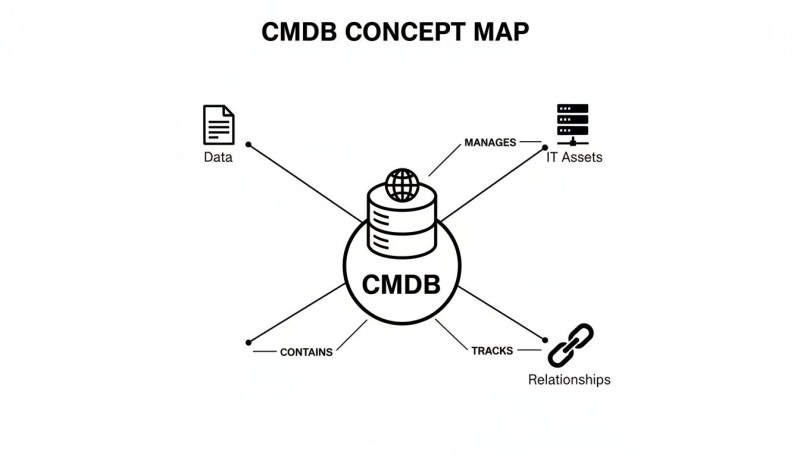
As you can see, its real power isn't just in listing what you have, but in showing how everything is connected.
Relationships: The Connections That Matter
If CIs are the landmarks on our map, then Relationships are the roads connecting them. This is where a CMDB really starts to earn its keep, because it reveals dependencies. A basic asset list might tell you that you have a server and an application. A CMDB tells you that the application runs on that server and simply cannot work without it.
Understanding these connections is a game-changer for troubleshooting and planning. Say your e-commerce website (a CI) suddenly goes down. The CMDB can instantly show you it relies on a specific database server (another CI). This means your IT support team can get straight to the root of the problem, saving precious time and money.
A CMDB without well-defined relationships is just a list. It's the mapping of dependencies that turns a simple inventory into a strategic tool for managing IT services and risk.
Attributes: The Details That Bring CIs to Life
So, we have our buildings (CIs) and the roads connecting them (Relationships). Attributes are the specific details about each of those buildings, the information that gives them context and makes them truly useful for day-to-day management.
Let's take a single laptop CI as an example. Its attributes might include:
- Unique Identifier: Asset Tag 12345
- Owner: John Smith
- Operating System: Windows 11 Pro
- Purchase Date: 15-Jan-2023
- Warranty Expiry: 14-Jan-2026
It's this granular information that helps you make smart decisions. Knowing the warranty expiry date helps with future budget planning, while tracking the OS version is absolutely critical for security patching.
These three building blocks, CIs, relationships, and attributes, are the heart of any good CMDB. But it’s also important to see how they fit into the bigger picture with processes like Information Technology Asset Management (ITAM). While a CMDB focuses on how assets are configured and connected, ITAM covers the entire lifecycle, from buying an asset to getting rid of it. The two go hand-in-hand, and a strong CMDB is the foundation for any serious asset management strategy.
If you're keen to explore the tools that make this happen, our detailed guide on IT asset management software is a great next step.
Why a CMDB Is a Game-Changer for UK SMBs
Let's be clear: a Configuration Management Database isn't just another bit of tech for organising your IT assets. It's a strategic tool that delivers real, measurable results for your business. For small and medium-sized UK businesses, getting your head around this is the first step to unlocking its power.
A well-maintained CMDB helps you graduate from simply managing technology to making smart decisions that cut costs, reduce risk, and make day-to-day operations run smoother. It gives you a reliable, single source of truth for your entire IT world, answering those critical questions that impact your bottom line. Without it, you’re basically flying blind. With it, you can see what’s coming and plan your moves with confidence.

From Reactive Firefighting to Proactive Control
One of the first things you'll notice is the shift from constantly putting out fires to actually preventing them. Instead of the usual panic when a key service goes down, your team has a map that shows exactly what's affected and why.
Picture this: your CRM software suddenly stops working. Without a CMDB, your IT support team could spend hours digging around, checking servers, networks, and apps. But with a CMDB, they can see in seconds that the CRM relies on a specific database server that's just tripped over.
This clarity turns troubleshooting from a guessing game into a focused fix. The result? Significantly faster problem resolution and far less downtime. That means your people stay productive and your customers stay happy.
Strengthening Your Security Posture
In today's world of non-stop cyber threats, knowing precisely what you have and how it all connects is security 101. A CMDB acts as your definitive guide, letting you move quickly when a new vulnerability pops up.
Imagine a critical security patch needs to be rolled out immediately. Your CMDB can spit out a list of every single server, laptop, and piece of software that needs the update. No more worrying about that one vulnerable machine hidden away on the network that everyone forgot about.
By providing a complete and accurate inventory of your IT landscape, a CMDB allows for rapid impact analysis and targeted remediation, dramatically shrinking your attack surface and improving your overall security resilience.
This isn't just a "nice-to-have" feature; it's fundamental to protecting your business data and your reputation.
Gaining Financial Visibility and Control
A CMDB also does wonders for your budget by showing you where your IT spend is really going. It helps you track assets like software licences and cloud services with pinpoint accuracy, highlighting waste and opportunities to save money.
You can easily spot if you're paying for more software licences than you have users, or if you've got cloud instances whirring away that nobody is using anymore. This kind of oversight stops the financial leaks and ensures you get the most value from every pound you invest in technology.
For UK businesses, particularly those moving to the cloud, this visibility is crucial. As more operations shift online, the case for a solid CMDB becomes about smart integration and return on investment. Recent forecasts show a huge move towards cloud platforms, with around 75% of all databases expected to be running in the cloud. A CMDB helps you manage this shift, providing the data needed for optimising licences, automating patches, and handling incidents efficiently. You can explore more about data integration adoption rates and trends.
Ultimately, a CMDB gives UK SMBs the power to make smarter, data-driven decisions. It provides the essential visibility needed to:
- Minimise Business Disruption: Understand how everything is connected, so a small change doesn't cause a massive outage.
- Optimise IT Spending: Track assets and usage to cut wasteful spending on unused software and services.
- Enhance Security: Keep a full inventory, allowing you to respond to threats faster and more effectively.
- Improve Service Delivery: Resolve issues more quickly, providing a better experience for both staff and customers.
It’s the foundational tool that connects your technology directly to your business goals, making it a true game-changer for growth and stability.
How a CMDB Powers Your IT and Cloud Strategy
A CMDB’s real power isn’t unlocked when it sits on its own. It truly comes to life when it plugs into your other essential IT tools, especially your IT Service Management (ITSM) platform. Think of the CMDB as the central intelligence hub that feeds critical data into the heart of your daily operations.
Your ITSM platform is the command centre for the IT department, managing everything from simple password resets to major system outages. The CMDB is the live, dynamic map that this command centre absolutely relies on. Without it, your team is flying blind, working with incomplete information that slows everything down.
When a critical service suddenly fails, the CMDB can instantly show which servers, applications, and network gear are involved. Even more importantly, it tells you which users or departments are affected. This changes incident management from a frantic, stressful search for clues into a precise, targeted response.
Fuelling Smarter IT Service Management
A good CMDB provides the "who, what, and where" that gives crucial context to every IT process. It breathes life into abstract tickets and alerts by connecting them to tangible assets, business services, and real people. This deep integration is what makes your entire IT operation more efficient and effective.
Here’s how it boosts specific ITSM functions:
- Incident Management: A server goes offline. The CMDB immediately shows all the applications and services that depend on it. Your support team knows exactly who to notify and can prioritise the fix based on genuine business impact, not just a technical severity rating.
- Problem Management: By looking at the history of specific CIs, you can spot patterns and recurring issues. Maybe a certain model of laptop consistently suffers from hard drive failures. This insight lets you find and fix the root cause for good, preventing a stream of future incidents.
- Change Management: Planning to update a core business application? The CMDB gives you a "blast radius" analysis, highlighting every system and service that could be affected by the change. This allows for proper planning and testing, dramatically reducing the risk of a change causing an unexpected outage.
A CMDB turns your ITSM platform from a simple ticketing system into a strategic operational tool. It provides the essential context needed to make faster, safer, and more informed decisions across all your IT processes.
This web of interconnected data is what helps your IT support team move beyond just reacting to problems. It helps them see the bigger picture, anticipate risks, and manage changes without causing chaos for the business.
Mastering the Modern Hybrid Cloud
For most UK businesses today, the IT environment isn't neatly tucked away in an office server room. It’s a hybrid world, a mix of on-premise servers, private cloud infrastructure, and public cloud services from providers like Amazon Web Services (AWS) or Microsoft Azure. This complexity can make it incredibly difficult to see what you have and how it all connects.
This is where a modern CMDB becomes absolutely essential. It’s built to track assets no matter where they are, giving you a single, unified view across your entire hybrid estate. It can map dependencies that cross these boundaries, like an on-premise application that relies on a database hosted in Azure. A CMDB is instrumental in establishing a practical hybrid cloud security strategy by providing a clear overview of all your assets and their interdependencies across various environments.
Without this unified view, managing security and compliance becomes a nightmare of disconnected spreadsheets and multiple dashboards. With a CMDB, you can answer critical questions in moments:
- Which of our cloud services are connected to sensitive customer data?
- Do all our virtual machines in AWS have the latest security patches installed?
- If we decommission this old physical server, will it break any of our cloud-based applications?
By providing a single source of truth for your entire hybrid environment, a CMDB ensures you maintain complete visibility and control, even as your IT infrastructure continues to evolve. It’s the map you need to navigate the complexities of modern IT with confidence.
Avoiding Common CMDB Implementation Mistakes
Kicking off a CMDB project is a big step, but frankly, this is where many organisations trip up. The road is often paved with good intentions that end up creating an expensive, inaccurate, and ultimately ignored system. Knowing where others have gone wrong is the best way to make sure your own project delivers real value right from the start.
The single biggest hurdle? Data quality. An inaccurate CMDB isn’t just useless; it’s actively dangerous. If you’re making critical decisions based on flawed data, you could cause bigger outages and create more security risks than if you had no CMDB at all. This problem almost always starts with relying too much on manual data entry, which is slow, riddled with human error, and impossible to keep up with.
The Myth of Manual Accuracy
Lots of businesses think they can start by getting their teams to fill out the CMDB with spreadsheets and whatever documentation they have lying around. This approach is, to put it bluntly, doomed. Modern IT environments are just too fluid; cloud servers get spun up, software gets updated, and hardware is swapped out constantly. Manual processes simply can’t keep pace with that level of change.
This is exactly why automated discovery and dependency mapping tools are non-negotiable. These tools are constantly scanning your network and cloud environments, identifying assets and mapping out how they're all connected. They feed live, accurate data straight into your CMDB, ensuring it reflects what’s happening right now, not what was happening three months ago.
A CMDB's value is directly proportional to the trustworthiness of its data. Without automation, that trust erodes quickly, turning a strategic asset into a neglected and unreliable data graveyard.
The gap between a CMDB's potential and its reality is a massive industry-wide problem. Research shows that while 84% of IT leaders believe a CMDB is essential for making good decisions, a tiny 17% actually trust that their data is fully accurate. For UK SMEs, that disconnect has real-world consequences, making it impossible to reliably analyse the impact of changes and slowing down incident response times.
Resisting the Urge to Boil the Ocean
Another classic mistake is trying to track absolutely everything from day one. This "boil the ocean" strategy is overwhelming and almost never works. The aim shouldn't be to document every last nut and bolt in your IT estate, but to build a CMDB that solves specific business problems.
So, start small. Pick a single, critical business service, maybe your e-commerce platform or your main customer application, and just map the components that are essential for it to run. This focused approach delivers value almost immediately, proves the CMDB's worth, and builds the momentum you'll need to expand it later.
Securing Team Buy-In and Governance
Finally, a CMDB project will fall flat without the right people and processes behind it. This isn't just about installing a new tool; it's about changing how people work with IT assets. It needs buy-in from everyone involved. Without clear ownership and solid governance, the data will quickly become a messy, untrustworthy jumble.
Good governance means figuring out:
- Who can add or change data in the CMDB.
- How data conflicts are sorted out (this is called reconciliation).
- How the data will actually be used in your day-to-day processes, like change management.
Not setting these rules is like building a library without a librarian. It’s why having a well-defined IT change management process is an absolute must for a successful CMDB. By getting your team on board early and setting clear guidelines, you make the CMDB a core part of your operations that everyone feels responsible for.
Getting Started with Your First CMDB Project
Rolling out a Configuration Management Database can sound like a huge job, and honestly, it can be if you go about it the wrong way. The secret isn't a massive, all-at-once "big bang" launch. The smart move is to take it step-by-step, delivering real value from the very beginning without burning out your team.
Your first step isn't even a technical one, it's about strategy. Before you touch any software, figure out exactly what business problem you're trying to solve. Is the goal to cut downtime for a critical service? Maybe you need to get better at security patching, or perhaps you're just trying to get a grip on runaway software costs. Nailing down a specific objective gives your project direction and makes it much easier to prove it was worth it later on.

Start Small with a Single Service
It's tempting to try and map your entire IT world in one go. Don't do it. A much better approach is to pick one single, high-value business service and start there. This could be your main e-commerce website, your CRM system, or any other application that your business absolutely relies on.
Focusing on just one service keeps the initial scope tight and manageable. The goal is simple: identify and map only the essential Configuration Items (CIs) that this one service needs to run.
This first small map provides value almost immediately. It becomes your go-to guide for troubleshooting problems or planning changes for that service. It’s a quick win that demonstrates the CMDB’s power to the people who matter, building support for expanding it later.
Think of it as the "Crawl, Walk, Run" approach. You'll start by crawling with one service. Soon, you'll be walking by adding a few more. Before you know it, you'll be running with a comprehensive map of your IT environment that genuinely helps the business.
Planning Your Initial Steps
Once you've picked your starting service, it's time to sketch out a simple plan. This doesn't need to be some monster project document; a basic checklist will work just fine. Your plan should cover a few key areas to make sure you get off to a smooth start.
Here’s a practical list of what to think about:
- Identify Stakeholders: Who needs to be in the loop? This usually means IT support staff, the business owner of the service you’re mapping, and anyone who manages the servers or network it runs on.
- Select the Right Tools: A CMDB often comes as part of a larger IT Service Management (ITSM) platform. The make-or-break feature you need is an automated discovery tool. This software will scan your network and cloud setups to find your CIs and their connections, saving you from tedious and error-prone manual data entry.
- Plan for Data Collection: How will you get the initial data in? Typically, you'll run your discovery tools and then sit down with your stakeholders to confirm the information is accurate.
- Define Governance Rules: Set some simple ground rules from the start. Who can update the CMDB? How will changes be tracked? For example, having a solid process for software licensing management is vital for keeping the data accurate and staying compliant.
By taking these deliberate steps, you turn a potentially intimidating project into a series of achievable wins that deliver clear business benefits right from day one.
Got Questions About CMDBs? We’ve Got Answers.
As a business owner or IT manager, you’re probably wondering what a CMDB actually means for your team day-to-day. Let’s cut through the jargon and answer the questions we hear most often, especially from small and medium-sized businesses just starting out.
These are the real-world concerns that pop up when you're thinking about getting your IT infrastructure properly organised.
Isn't a CMDB Overkill for a Small Business?
Not these days, no. It's true that older CMDBs were notoriously clunky and complicated, but modern tools are a different beast entirely, especially when managed by an IT partner. The secret for any small business is to start small. Forget trying to map every single device from day one.
Instead, pick one critical business service and focus on that. A good partner will help you figure out what matters most and use automated tools to build out your CMDB from there. This way, you get value straight away without creating a massive, time-consuming project.
Think of a modern CMDB less like a perfect, dusty encyclopaedia of your IT and more like a living, practical map. It's there to solve specific business problems, starting with your most pressing ones.
How Is This Different from My Asset List?
This is a great question, and the difference is huge. An asset inventory simply tells you what you own. It's a list: we have 15 laptops, three servers, and so on.
A CMDB, on the other hand, tells you what you own, how it’s set up, and, crucially, how it all connects. It shows you the relationships between your assets. It knows that a specific piece of software runs on a particular server, and that your sales team relies on that software to close deals. It's this relationship data that lets you see the ripple effect of a problem and fix things fast, something a simple list could never do.
How On Earth Do We Keep It Up-to-Date?
The only way this works in the real world is with automation. Trying to update a CMDB by hand is a recipe for disaster. Your IT environment just changes far too quickly for anyone to keep up manually.
Modern CMDBs solve this with "discovery" tools. These automatically scan your network and cloud services, finding all your assets and mapping out how they're connected. They then use "reconciliation" rules to update the database without creating messy duplicates or errors. Working with a managed IT provider means these tools are set up correctly from the start, so your data stays reliable and genuinely useful for making decisions.
At HGC IT Solutions, we take the mystery out of setting up a Configuration Management Database for UK businesses. We deal with the technical side of things, using automation to build a clear, accurate map of your IT world. This frees you up to focus on what you do best.
To see how we can bring this kind of clarity and control to your IT, get in touch with our experts today.