

At its heart, network redundancy is about having a solid Plan B for your internet and network connections. It’s a lot like having a spare tyre in your car. You hope you never need it, but if you get a flat, you're not stranded on the side of the road. It ensures your business keeps running smoothly, even when a piece of your network puzzle fails.
Why Network Redundancy Is Your Business Lifeline

For almost any business today, a working internet connection is as vital as electricity. When it goes down, everything grinds to a halt. We're talking lost sales, annoyed customers, and a team that can't access cloud tools, send emails, or take payments. This is precisely where network redundancy proves its worth.
Think of it as your digital safety net. It catches you when the unexpected happens, whether that’s a digger accidentally severing a cable down the street, a router giving up the ghost, or your main internet provider having a major outage. Redundancy simply gives your data another way to get where it needs to go.
The True Cost of Downtime
It's easy to underestimate just how much an outage can hurt your bottom line. According to the UK Cyber Security Council, the average cost of network downtime for UK businesses is a shocking £1,200 per minute. That figure alone shows why being prepared isn't just for massive corporations.
The same report noted that 52% of small and medium-sized enterprises (SMEs) have already put some form of network redundancy in place to shield themselves from this risk. It's a clear sign that businesses are waking up to the reality of digital dependency.
A redundant network is designed to eliminate single points of failure. If one component stops working, another one automatically takes over, often so seamlessly that your users and customers notice nothing at all.
This proactive mindset completely changes the game. Instead of scrambling and asking, "What do we do now that we're offline?", you're already prepared, ensuring you stay online.
Core Benefits for Your Business
Having a redundancy plan in place isn't just about avoiding disaster; it delivers tangible benefits that strengthen your entire operation and support your financial health.
Key Benefits of Network Redundancy at a Glance
A redundant setup offers several clear advantages that directly impact your operational stability and reputation. The table below breaks down the main perks.
| Benefit | Impact on Your Business |
|---|---|
| Increased Reliability and Uptime | Guarantees your essential services, from payment systems to customer support portals, are always available. |
| Business Continuity | Keeps your team productive and your revenue flowing, even during unexpected technical problems. |
| Enhanced Customer Trust | A consistently reliable service shows customers you're a professional and trustworthy brand. |
| Improved Security | Helps contain problems. For instance, when paired with strategies like network segmentation, it can prevent a localised issue from taking down your entire network. |
Ultimately, these benefits combine to create a more resilient, trustworthy, and profitable business. It's a foundational piece of any modern IT strategy.
Exploring the Different Layers of Redundancy

When we talk about what is network redundancy, it helps to think of it not as a single action, but as a series of protective layers. It’s a lot like planning a road trip. You don't just rely on one thing; you bring a spare tyre, a paper map just in case your phone dies, and maybe you've even planned a different route if there’s a traffic jam.
Each layer of network redundancy protects you from a different kind of problem. Let's start with the basics and work our way up to the more advanced setups.
Hardware and Device Redundancy
The simplest place to start is with hardware redundancy. This is your spare tyre. It's the idea of having a duplicate piece of critical equipment—like a router, switch, or firewall—ready and waiting.
If your main router suddenly gives up the ghost, an automatic failover system can switch all your network traffic over to the backup unit, often in just a few seconds. It’s a straightforward, effective way to ensure a single hardware failure doesn't bring your entire business to a halt.
Link and Path Redundancy
Moving up a layer, we get to the connections themselves. Link redundancy is all about having more than one way to get to the internet. Think of it as knowing two different roads to get to the same shop.
If a construction crew accidentally cuts your main fibre cable, a second connection from a different provider—like a 5G backup or a separate broadband line—can take over instantly. This keeps your team online even when things go wrong outside your building.
This is a smart way to protect your business from problems you have no control over. For many businesses, a high-performance business leased line serves as the main connection, with a standard broadband line acting as a cost-effective backup.
Path redundancy is a bit more granular. It makes sure data has multiple routes it can take inside your own network. If one connection between switches gets overloaded or fails, traffic is automatically rerouted through a different path to avoid a bottleneck.
Power and Geographic Redundancy
Now we get to the heavy-duty layers, the kind you need when any amount of downtime is simply not an option.
-
Power Redundancy: It's simple: your network gear is useless without electricity. This layer protects you from power cuts. It can be as simple as an Uninterruptible Power Supply (UPS) to ride out short blips, or a backup generator for longer outages.
-
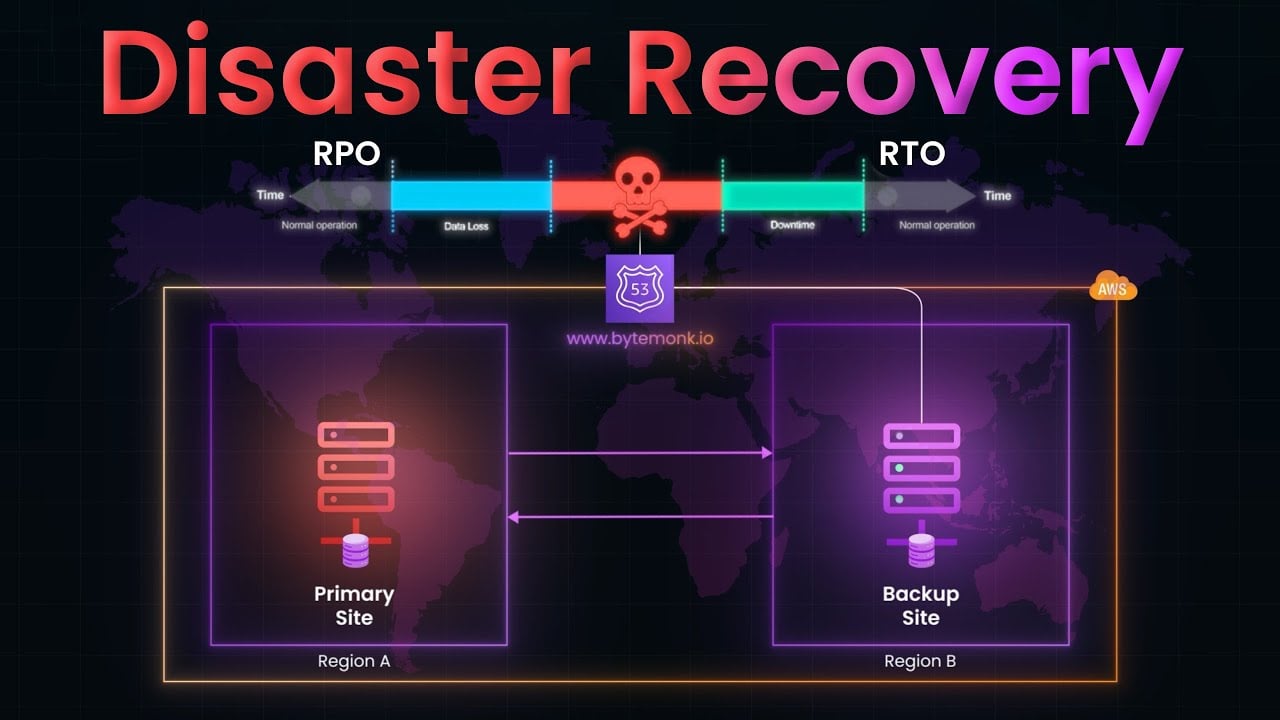
Geographic Redundancy: This is the ultimate safety net. It involves having a complete copy of your essential network infrastructure running in a different physical location. If a major disaster like a flood or fire hits your primary office, everything can switch over to the secondary site. While this used to be just for big corporations, the cloud has made this kind of resilience much more achievable for smaller businesses.
Putting Redundancy into Practice
Alright, let's move from the 'what' to the 'how'. What do these redundancy strategies actually look like in a real business? These aren't just high-tech theories for big corporations; they are practical, proven setups that businesses of all sizes are using right now to protect their operations.
Getting your head around these common patterns will help you have a much more productive chat with your IT team or managed service provider. Each one tackles a different potential point of failure, from a momentary internet blip to a complete hardware meltdown, so you can find a solution that genuinely fits your business.
The Lifesaver: 4G and 5G Backup
This is easily one of the most common and budget-friendly safety nets you can have. Think about a busy café or a retail shop – the card machine is everything. If the main broadband connection drops, the business grinds to a halt. This is where a 4G or 5G mobile backup becomes an absolute lifesaver.
Most modern business routers can be set up to automatically flip over to the mobile network the second the main line goes down. This switch, known as 'failover', is usually so fast that you won't even notice it. Your payment terminals, cloud-based till, and customer Wi-Fi just keep on working.
- Best for: Retail shops, cafés, small offices, and any business where sales terminals or basic internet access is make-or-break.
- Pros: It’s affordable, quick to implement, and available pretty much anywhere with a mobile signal.
- Cons: Mobile network speeds can vary and might not be fast enough for heavy-duty tasks like shifting large files or running complex software.
The Belt-and-Braces: Dual ISP Strategy
For businesses where a stable, high-quality internet connection is completely non-negotiable, the dual ISP (Internet Service Provider) approach is the next level up. This simply means you have two separate internet lines coming into your building from two different providers. You might have a primary fibre line from one company and a secondary broadband connection from another.
This setup protects you if one provider has a major outage. Should one network go down in your area, your router can automatically reroute all your traffic through the second line. It's a powerful way to build in some serious resilience.
A crucial tip here is to make sure the two lines are genuinely separate. That means choosing providers that use different physical networks. The last thing you want is for a single damaged cable in the street to take out both of your 'redundant' connections.
The Modern Approach: Cloud-First Redundancy
The way we all work has changed, and so have our backup plans. According to a recent report from the UK Tech Partnership, a staggering 70% of UK businesses now rely on cloud-based solutions for their redundancy. The focus has shifted from just keeping a physical connection live to guaranteeing access to essential cloud services like Microsoft 365 or your VoIP phone system. You can read more about this shift on the UK Tech Partnership website.
This move to the cloud makes perfect sense. The same report found that businesses with solid redundancy plans in place cut their downtime by an average of 60%. For a creative agency, for example, this might mean setting up diverse routes to their cloud data centres. This ensures their team can always get to their projects and keep collaborating, no matter what happens to the local internet.
How to Plan and Budget for Network Redundancy
Thinking about network redundancy can feel a bit overwhelming, but it really just starts with a few simple questions about your business. A good plan isn't about buying the most expensive gear; it's about making smart investments that protect your operations without breaking the bank. The real aim is to build resilience in a way that makes perfect financial sense.
First things first, you need to find your single points of failure. Think of your business like a chain. Which link, if it snapped, would bring everything grinding to a halt? For most small businesses, the usual suspects are the main internet connection or the primary router.
Pinpointing these weak spots immediately tells you where to focus your attention and your budget. Just like that, "network redundancy" goes from being a vague, technical idea to a concrete to-do list.
Performing a Simple Cost-Benefit Analysis
Once you know where things could go wrong, it's time to talk money. The big question is: how much does an hour of downtime actually cost your business? This figure is the bedrock of your budget. Think about lost sales, staff who can't work, frustrated customers, and the potential hit to your reputation.
A recent survey from the British Standards Institution (BSI) found that while 85% of larger UK organisations have formal plans in place, smaller businesses often fall behind. Interestingly, the same study showed the average UK business dedicates around 12% of its IT budget to keeping things running, which shows just how seriously this is taken across the board.
When you weigh up the price of a potential outage against the cost of a backup solution, the decision often makes itself. If a simple 5G backup costs you £30 a month but saves you from a £1,000 loss during an outage, the return on investment is a no-brainer.
This flowchart neatly sums up the logic: the right strategy depends entirely on how much an outage would hurt your bottom line.

The takeaway here is that your plan should mirror your financial risk. If downtime is a catastrophe, you need a rock-solid solution. If it's more of an inconvenience, a simpler, cheaper backup will do the job just fine.
Setting Realistic Budgets and Expectations
With a clear idea of the costs involved, you can set a budget that actually makes sense for you. Your spending should directly match the level of protection your business genuinely needs.
- Low-Cost Solutions (£20-£50/month): For a small shop or a local service business, a 5G mobile backup is often all you need to keep the tills ringing and emails flowing.
- Mid-Range Solutions (£100-£300/month): If you rely heavily on cloud apps and VoIP phones, a second broadband line from a different provider (dual ISP) is a brilliant middle ground.
- Higher-Tier Solutions (Custom Pricing): For businesses where every second offline costs a fortune, a dedicated leased line with automatic failover provides guaranteed uptime.
The table below breaks down how these strategies stack up, giving you a clearer picture of the cost versus the benefit for a typical small business.
Comparing Redundancy Strategies Cost vs. Benefit
| Redundancy Strategy | Estimated Annual Cost | Best For | Potential Downtime Avoided (Hours/Year) |
|---|---|---|---|
| 5G/Mobile Backup | £240 – £600 | Small offices, retail (card machines), basic email/web access. | 10-20 |
| Dual ISP (Broadband) | £1,200 – £3,600 | Businesses using cloud apps, VoIP, and remote access. | 20-40 |
| Leased Line with Failover | £4,000+ | Finance, e-commerce, or any business where uptime is non-negotiable. | 40+ |
Ultimately, choosing the right strategy is about balancing the initial investment against the hours—and pounds—you stand to save by staying online.
It’s also crucial to make sure your redundancy plan lines up with any formal agreements you have in place. To get a better handle on what to expect from your providers, take a look at our guide on https://hgcit.co.uk/blog/it-service-level-agreements/.
Finally, remember that network redundancy is just one piece of a bigger puzzle. To truly protect your business, it’s a great idea to use a disaster recovery planning checklist to make sure you've covered all the angles, from your internet connection to your data.
Testing and Maintaining Your Redundancy Plan
Putting a redundant network in place is a brilliant first step, but it’s certainly not a ‘set it and forget it’ job. A backup plan is completely useless if it doesn’t actually work when you need it most. This is why regular testing and maintenance are every bit as important as the initial setup.
Think of it like a fire drill. You don’t just install fire alarms and hope for the best; you practise the evacuation route so everyone knows exactly what to do. The same idea applies here. You have to be certain your failover systems will kick in smoothly when a real problem hits.
Creating a Proactive Maintenance Schedule
Regular checks are the foundation of any solid redundancy plan. They help you catch little issues—like outdated software or a misconfigured router—before they have a chance to cause a full-blown outage. This proactive approach keeps your safety net strong and ready to catch you.
Your maintenance schedule doesn't need to be complex. A simple checklist can keep everything on track and make sure nothing gets missed.
- Quarterly Failover Tests: At least once every three months, you need to deliberately simulate a failure. This could be as simple as unplugging your main internet line to confirm the 4G/5G backup or secondary line takes over just as it should.
- Firmware and Software Updates: Check for updates on your routers, switches, and firewalls every month. Keeping your equipment's software current is crucial for both security and performance.
- Hardware Health Checks: Once a year, give your backup hardware a proper physical inspection. Look for any signs of wear and tear and make sure everything is running correctly.
The Importance of Monitoring and Alerts
You can’t fix a problem you don’t know about. This is where network monitoring tools come into their own, acting as an early warning system that keeps a constant eye on the health of your network and all its connections.
Effective monitoring means you're not just waiting for things to break. Instead, you get an alert the moment a failover happens. This allows your IT team to investigate the primary failure immediately, rather than discovering it hours later when the damage is already done.
These systems give you real-time visibility into how your network is behaving. To keep everything in check, using essential network diagnostic utilities is crucial for finding and fixing potential issues before they escalate.
You can also explore our guide to the best IT infrastructure monitoring tools to find the right solution for your business.
Your Network Redundancy Questions Answered
When you start digging into network redundancy, a few questions always pop up. Let's tackle the most common ones business owners ask, giving you clear answers so you can make informed decisions.
How Much Redundancy Do I Actually Need?
This really boils down to one thing: how much does downtime cost your business? The answer is different for everyone.
A local coffee shop, for instance, primarily needs its card machine to stay online. For them, a simple 4G/5G mobile backup is often enough to keep the tills ringing. It’s a small investment that prevents a major headache.
On the other hand, a design agency that depends on constant video calls and cloud-based software has a much lower tolerance for outages. They would probably need a more solid setup, like a completely separate internet line from a different provider.
Start by asking this one simple question: 'What's the real cost to my business if we're offline for an hour?' Your answer is the single best guide to how much you should invest.
Thinking about it this way helps you scale your solution to your specific risk. You get the protection you need without spending a penny more than necessary.
Isn't Cloud Backup the Same Thing?
That’s a common mix-up, but no, they’re very different. They are, however, essential partners in keeping your business running. Think of it like a vault and the bridge leading to it.
- Cloud Backup is your vault: It’s where all your critical business data is safely stored off-site.
- Network Redundancy is your bridge: It’s the reliable connection that guarantees you can always get to that vault.
Having one without the other is a bit like having a map but no car. You might have perfectly secure data sitting in the cloud, but if your internet connection fails, it’s completely out of reach. A truly resilient business needs both.
What's the Very First Step I Should Take?
The best place to start is with a straightforward ‘single point of failure’ analysis. This sounds technical, but it’s really just about mapping out your weak spots. Get your team together and ask one question:
"If one thing here broke, what would take our whole business offline?"
For most small businesses, the answer is usually the main internet router or the single cable coming into the building. Pinpointing that one critical component immediately tells you where to focus your attention first. It gives you a practical, manageable starting point for building a stronger, more dependable operation.
At HGC IT Solutions, we specialise in creating practical and cost-effective IT strategies that keep your business running smoothly. From robust network redundancy to secure cloud services, we're here to help. Discover our managed IT services and build a more resilient future today.
