

At its heart, server virtualization is all about getting more out of the hardware you already own. It's a clever bit of technology that lets a single, powerful physical server act like it’s several different servers all at once. We do this by slicing up its resources—things like processing power and memory—and creating multiple independent virtual environments on that one machine.
It’s one of the smartest ways to make your IT setup more efficient and a lot easier on the budget.
From One Server to Many Virtual Machines

Think about a typical server sitting in your office. In the old days, that machine would run one operating system and be dedicated to a single job, like hosting your website or running a database. Need a new application? You’d have to go out and buy another physical server. This one-to-one setup is not just expensive; it’s incredibly wasteful, as most servers only ever use a tiny fraction of their available power.
That’s exactly the headache server virtualization was designed to fix. Instead of letting all that expensive hardware sit idle, we introduce a special software layer that carves up the physical server into multiple, completely separate virtual machines (VMs).
The Power of Partitioning
Each of these VMs acts like its own independent server. It has its own operating system and its own applications, all running on the same physical box but completely walled off from each other. If one VM happens to crash or needs a reboot, the others carry on without a hitch.
This gives you incredible flexibility. For example, you could have one VM running an old Windows Server for a legacy application that the business still needs, while another runs Linux for your modern web server—all on the same piece of hardware.
By separating the software from the hardware it runs on, server virtualization lets you squeeze every last drop of value from your investment. You can shrink your physical footprint and react much faster to new business needs.
This concept is the foundation for other powerful solutions, too. If you're curious about how you can centralise your team's desktops, you can learn more about virtual desktop infrastructure in our detailed guide.
For now, let's quickly break down what server virtualization really means for a business like yours. The table below gives a simple overview.
Server Virtualization at a Glance
| Concept | What It Means for Your Business |
|---|---|
| Consolidation | Run many "virtual" servers on one physical machine, drastically cutting hardware costs. |
| Efficiency | Use your server's full power instead of letting it sit idle. Fewer servers mean lower energy bills. |
| Flexibility | Mix and match operating systems (like Windows and Linux) on the same hardware. |
| Speed | Set up a new server in minutes with a few clicks, not weeks waiting for a delivery. |
| Resilience | Backing up and recovering an entire server becomes much faster and simpler. |
As you can see, the benefits go far beyond just saving a bit of cash. It's about making your entire IT operation more nimble and robust.
Key Benefits at a Glance
So, what are the immediate wins when you move to a virtual environment? Here’s what you can expect:
- Reduced Hardware Costs: You can run workloads that once needed five, ten, or even more servers on just one or two physical machines. That’s a huge saving on hardware and ongoing maintenance.
- Lower Operating Expenses: Fewer servers mean less electricity is needed to power and cool them. This shrinks your data centre footprint and your energy bills right away.
- Improved Agility and Speed: Need a new server for a project? Your IT team can spin up a new VM in minutes. No more waiting weeks for new kit to be ordered and installed.
- Simplified Disaster Recovery: Backing up a virtual machine is as simple as copying a file. Restoring it is just as quick, which is a massive boost for your business continuity plans.
How Do Virtual Servers Actually Work?
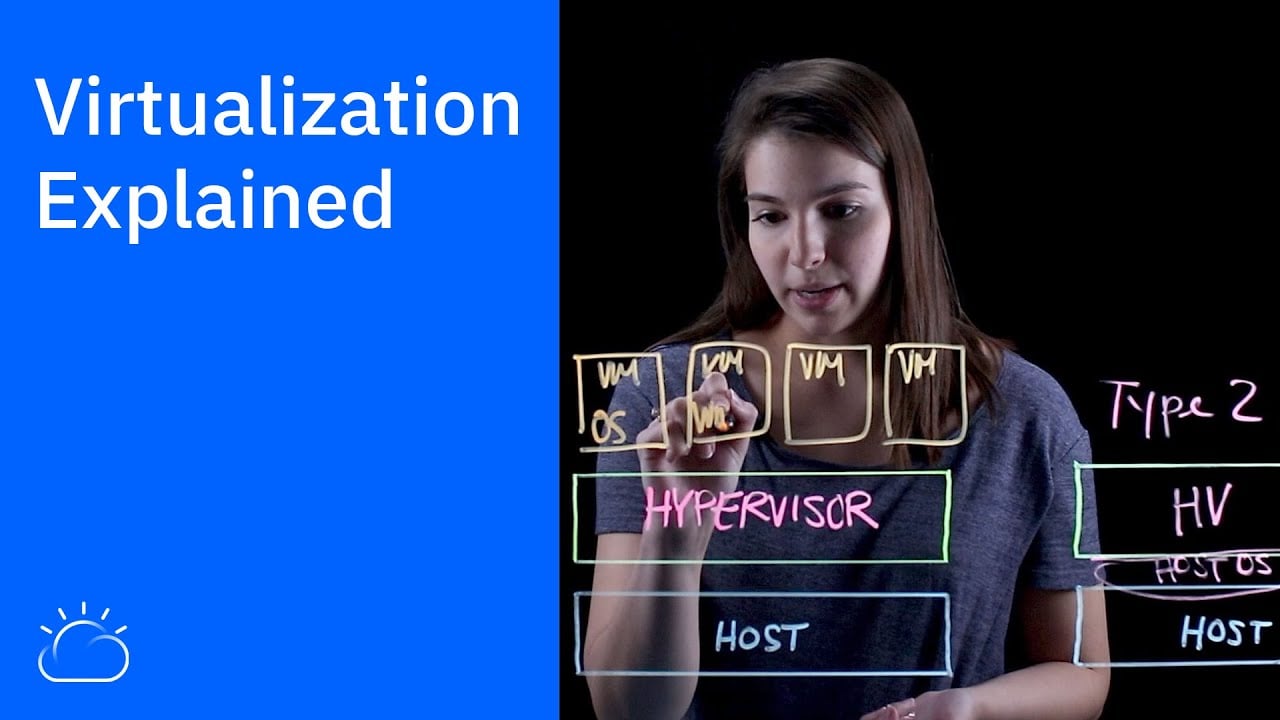
So, how does one physical server manage to juggle so many different tasks at once? The magic behind it all is a clever piece of software called a hypervisor. Think of it as the central nervous system of your virtual setup, acting as a traffic controller for all the server's physical resources.
Let's use an analogy. Imagine your physical server is a large, empty warehouse. The hypervisor is the site manager who comes in and partitions that vast space into individual, secure units. Each unit gets its own power, lighting, and floor space, but they all remain completely separate from their neighbours.
That's precisely what a hypervisor does with a server's hardware. It takes the physical components—the processing power (CPU), memory (RAM), and storage—and carves them up. It then allocates these resources to create multiple, isolated digital workspaces known as virtual machines (VMs).
This is what allows a single piece of hardware to run, say, a Windows Server for your file sharing and a Linux server for your company website at the same time, without them ever stepping on each other's toes. The hypervisor makes sure that a busy moment on the website doesn't slow down access to your critical business files.
The Two Flavours of Hypervisor
Just like site managers, not all hypervisors operate in the same way. They generally come in two main types, and knowing the difference is key to understanding the nuts and bolts of server virtualisation.
-
Type 1 Hypervisor (Bare-Metal): This is the go-to for most business setups. It's installed directly onto the server's hardware, acting as the foundation for everything else. Because it communicates directly with the physical components, it's incredibly fast and efficient. This is like building the walls for your warehouse units directly onto the concrete foundation.
-
Type 2 Hypervisor (Hosted): This kind runs more like a standard application on top of an existing operating system (like Windows or macOS). You might use one on your laptop to test a new piece of software in a safe environment. It’s handy for development but isn't as efficient because every request has to pass through the host operating system first. Think of this as putting up temporary, self-contained pods inside the finished warehouse.
For any business serious about virtualising its infrastructure, Type 1 hypervisors are the industry standard. They simply offer better performance, security, and room to grow.
VMs vs Containers: What's the Difference?
As you dig deeper into virtualisation, you'll inevitably come across another term: containers. While they achieve a similar goal—running multiple applications on a single machine—they go about it in a completely different way.
Let’s stick with our property analogy for a moment.
A Virtual Machine (VM) is like building a complete, self-contained house on a plot of land. It has its own foundations (virtual hardware), its own plumbing and wiring (a full guest operating system), and its own distinct structure. This makes it incredibly secure and isolated, but it's also resource-heavy and takes a while to build and get running.
A Container is more like a modern flat in an apartment block. All the flats share the building's core infrastructure—the foundations, main plumbing, and electrical grid (the host operating system's kernel). Each flat just contains its own furniture and decor (the application and its specific files).
This difference is really important when deciding on the right approach.
| Feature | Virtual Machine (VM) | Container |
|---|---|---|
| Isolation Level | Completely isolated, with its own OS. | Shares the host OS kernel with other containers. |
| Resource Usage | Heavier. Each VM needs a full operating system. | Lightweight. Uses far fewer resources. |
| Start-up Speed | Slower (can take minutes). | Extremely fast (usually seconds). |
| Best For | Running applications that need different operating systems. | Running many copies of a single, modern application. |
For most small and medium-sized businesses, VMs hit the sweet spot. They provide a robust, secure, and flexible way to consolidate servers and modernise your IT setup. Containers are fantastic, but VMs are often the more practical and versatile starting point for infrastructure virtualisation.
Exploring the Different Types of Virtualisation
Now that we see the hypervisor as the "site manager," it’s worth knowing they don’t all use the same building plans. The world of server virtualisation isn't a one-size-fits-all deal; there are a few different ways to go about it, and each has its own sweet spot.
Getting your head around these approaches helps you make much smarter decisions for your IT setup. The three main flavours you'll come across are full virtualisation, paravirtualisation, and OS-level virtualisation. Let's dig into what each one actually means for your business.
This diagram shows how you get from one physical machine to the multiple virtual environments it can host.

As you can see, that hypervisor layer is the magic ingredient, the essential bridge that makes the whole thing possible.
Full Virtualisation: The All-Rounder
Full virtualisation is the most common approach, and for good reason—it’s straightforward. In this model, the hypervisor creates a complete, simulated computer. The guest operating system has no clue it’s running on virtual parts; it thinks it has its own dedicated hardware.
This total separation is its biggest plus. You can run completely different operating systems, like Windows and Linux, on the same server without them ever bumping into each other. The only real trade-off is a small performance hit, as the hypervisor has to translate every single command between the VM and the actual hardware.
Paravirtualisation: The Team Player
Paravirtualisation is a more collaborative model. Here, the guest operating systems are modified to be aware they're in a virtual environment. Instead of the hypervisor doing all the translation work, the guest OS can communicate more directly, which is a lot more efficient.
Think of it as having a direct hotline instead of going through a switchboard. This teamwork lightens the hypervisor's load, leading to a noticeable performance boost over full virtualisation. The catch? The guest operating system needs to be specifically tweaked to work this way, which can limit your choice of what to run.
OS-Level Virtualisation: The Lightweight Specialist
Finally, we have OS-level virtualisation, which you’ve probably heard of as "containers." This method is a bit different. It doesn't use a hypervisor to create entire virtual machines. Instead, it carves up the main operating system itself, letting you run multiple isolated applications inside these containers.
This approach is incredibly quick and uses far fewer resources because you're not firing up a whole new operating system for every single application. It's perfect for running lots of copies of the same app, but you lose the flexibility to mix and match different operating systems.
This kind of sandboxed environment is also the foundation for other IT solutions. For example, the technology is key to delivering secure, cloud-based desktops. You can explore more about how hosted desktops can benefit your business in our related guide.
Comparing Virtualisation Types for Your Needs
Choosing the right approach really comes down to your specific needs. This table breaks down the key differences to help you see which method might be the best fit for your business goals.
| Virtualisation Type | How It Works | Best For | Key Benefit |
|---|---|---|---|
| Full Virtualisation | The hypervisor fully emulates hardware. The guest OS is completely unaware it's virtual. | Running diverse operating systems and legacy applications without modification. | Maximum Isolation and Compatibility: It just works with almost any OS. |
| Paravirtualisation | The guest OS is modified to communicate directly with the hypervisor. | High-performance environments where speed is critical and OS options are flexible. | Improved Performance: Faster and more efficient than full virtualisation. |
| OS-Level Virtualisation | Virtualises the host OS to run isolated application "containers" on a shared kernel. | Deploying and scaling modern, web-based applications quickly and efficiently. | Extreme Speed and Density: Incredibly lightweight and fast to launch. |
Each path offers clear advantages depending on what you’re trying to achieve, whether it’s maximum compatibility, raw performance, or lean efficiency.
The Real-World Benefits of Virtualisation
It's one thing to understand the tech behind server virtualisation, but what does it actually do for your business? Once you look past the technical diagrams, the real advantages become clear in your day-to-day operations and, most importantly, on your bottom line. These are tangible, practical benefits that make a genuine difference.

Here in the UK, moving to virtual environments is a cornerstone of modern IT strategy, driven by the need for smarter, more cost-effective computing. With giants like Google and AWS pouring billions into expanding their UK data centre footprint, you can see just how important this technology has become. In fact, the European server virtualisation market is expected to grow by roughly 6.9% each year through 2033, a clear sign that businesses are fully embracing this shift.
Big Savings on Costs
Let's start with the most obvious win: cost reduction. In the old days, a new project or service almost always meant buying a brand-new physical server. Virtualisation flips that on its head by allowing you to run multiple virtual servers on a single physical machine.
This process of server consolidation delivers direct savings in a few key areas:
- Less Hardware to Buy: Instead of purchasing five, ten, or even more servers for different tasks, you might only need one or two powerful machines. That’s a huge cut in your initial capital spend.
- Lower Energy Bills: Fewer physical servers plugged in means less electricity needed to power them and, crucially, to keep them cool. These operational savings really start to add up over time.
- Smaller Physical Footprint: You instantly free up valuable office or server room space, which can be repurposed or can lower your colocation costs if you use a data centre.
A Major Boost in Efficiency
Virtualisation makes your entire IT operation far more agile. Forget waiting weeks for a new server to be delivered and set up; now, you can deploy one in minutes.
Imagine your development team needs a clean environment to test a new app. Instead of a lengthy procurement process, your IT team can simply clone an existing virtual machine or spin up a new one from a pre-configured template. This speed means your business can react to new opportunities almost instantly.
This ability to create isolated, reproducible environments on demand is also fantastic for improving effective test environment management strategies. New projects can get started immediately without being held up by hardware delays.
Virtualisation transforms IT from a slow-moving cost centre into a fast, flexible enabler of business growth. It removes hardware bottlenecks and allows your team to focus on innovation instead of installation.
A Game-Changer for Disaster Recovery
This might just be the most powerful benefit of all. For any business, improving your disaster recovery plan is a top priority, and virtualisation makes it dramatically simpler.
With a traditional physical server, backups can be slow, clunky, and complicated. With virtualisation, an entire server—its operating system, applications, and all your data—is neatly contained within a set of files. Backing it up becomes as straightforward as copying those files somewhere safe.
This simple change makes all the difference when things go wrong:
- Faster Backups: You can take "snapshots" of your virtual machines in moments with almost no disruption to your daily work.
- Quicker Restorations: If a server fails, you can restore it simply by launching its backup files on another host machine. This cuts recovery times from days down to hours, or even minutes.
- Simplified Testing: It’s easy to test your disaster recovery plan. Just spin up your backup VMs in an isolated network to make sure everything works perfectly before you actually need it.
This streamlined approach is a massive win for business continuity. If you'd like to dive deeper, we have a complete guide on creating an IT disaster recovery plan. By making your critical systems easier to protect and restore, virtualisation gives you invaluable peace of mind.
Planning Your Move to a Virtual Environment
Making the switch to server virtualisation is one of the most significant IT projects any business can tackle. It promises lower costs and far more flexibility, but getting there hinges entirely on careful planning. If you just jump in, you’re asking for trouble. Taking the time to build a solid roadmap is non-negotiable.
This move isn't just about new technology; it’s a fundamental change in how you manage your company’s IT resources. The first step is to get a crystal-clear picture of what you have right now. This means taking a full inventory of every physical server in your business. You need to know exactly what each one does, how much of its power is actually being used, and which applications rely on it. This groundwork helps you pinpoint the best servers to virtualise first.
Creating Your Migration Shortlist
When it comes to virtualisation, not all servers are created equal. Your best bet is to start with the low-hanging fruit—those servers that are important but aren't being pushed to their limits. Think about your file servers, print servers, or maybe a development environment. They’re generally less intensive and carry a much lower risk if anything hiccups during the move.
The process of turning a physical server into a virtual one is known as P2V (Physical-to-Virtual). By starting with these simpler P2V migrations, your team can get a feel for the process and build confidence before you even think about touching the big, mission-critical systems like your primary database or email server.
Choosing the Right Hypervisor
The hypervisor is the engine of your new virtual setup, so picking the right one is a huge decision. For most businesses, the choice boils down to a few major players, each with its own strengths and pricing models.
Here are the main contenders you'll want to look at:
- VMware vSphere: A long-time market leader, known for being incredibly reliable and packed with features. It's often the go-to for larger or more complex setups.
- Microsoft Hyper-V: Because it's built into Windows Server, this is often the most natural and cost-effective choice for businesses already running on a Microsoft stack.
- Open-Source Options: Platforms like Proxmox or KVM are powerful and don't come with licensing fees, but they do demand more hands-on technical skill to manage effectively.
The best choice really depends on your budget, your team's existing expertise, and what your applications need to run smoothly.
A well-planned virtualisation project isn't just about technology; it's about aligning your IT infrastructure with your business goals. It lays the groundwork for a more agile and resilient operation for years to come.
This alignment is more critical than ever. In the UK, server virtualisation is the foundation of modern cloud strategies. By 2025, 54% of UK enterprises have adopted a hybrid cloud model, which leans heavily on virtualisation to move workloads between on-site and cloud environments securely. This trend shows just how vital virtualisation has become for any business looking to modernise. You can discover more insights about UK cloud adoption statistics on sqmagazine.co.uk.
Avoiding Common Migration Pitfalls
A successful move is as much about avoiding mistakes as it is about doing things right. One of the most common traps is "VM sprawl." It’s so easy to create a new virtual machine that it’s tempting to spin one up for every little task. Before you know it, you can end up with a cluttered, inefficient, and unmanageable environment.
Software licensing is another minefield. The rules can be complicated and often change when you move to a virtual environment. Before you migrate anything, double-check your software agreements to make sure you stay compliant and avoid any nasty, expensive surprises.
A carefully planned approach, perhaps guided by an expert, helps you navigate these challenges. For a deeper look at managing these new complexities, have a read of our guide on what a managed IT infrastructure involves. By planning properly from the outset, you can ensure your transition is a smooth one.
Your Virtualization Questions, Answered
Making a big change to your IT setup always brings up questions, and that’s perfectly normal. To help put your mind at ease, we’ve put together some straightforward answers to the most common queries we hear from business owners about server virtualization.
Is a Virtual Server Environment Actually Secure?
This is usually the first question people ask, and for good reason. The short answer is yes. When configured properly, a virtual environment can be just as secure, if not more so, than a traditional physical one. The magic is in the setup and management.
Think of each virtual machine (VM) as being in its own sealed room, even though they all live on the same physical server. This isolation means that if one VM gets hit with a virus, the infection can’t jump across to the others. Modern hypervisors also pack in some serious security features, giving you a central dashboard to monitor everything. Of course, just like any IT system, its strength depends on good habits like consistent patching, smart network design, and tight access controls.
What’s the Difference Between Server Virtualization and Cloud Computing?
It’s really easy to get these two mixed up, but they’re fundamentally different concepts. Here’s a simple way to look at it:
Server virtualization is a technology. It’s the engine that lets one physical server pretend to be many individual ones. You can use this technology to build a private virtual setup right in your own office.
Cloud computing is a service. It’s about someone else (like Amazon Web Services or Microsoft Azure) using that virtualization technology on a massive scale and renting out the resources to you over the internet.
So, virtualization is one of the key building blocks that makes cloud computing possible.
How Much Does It Cost to Get Started with Virtualization?
There’s no single price tag, as the cost really depends on the size and needs of your business. Your initial investment will likely cover a few key areas:
- Hardware: You might need to buy a new, more powerful server that has the muscle to run several VMs at once.
- Software Licensing: This covers the hypervisor software. Some, like Microsoft’s Hyper-V, are included with Windows Server, which can be a nice bonus. You might also need management tools.
- Expertise: The migration itself takes time and skill. This could mean training for your team or bringing in an expert to manage the project.
It’s important to see this as an investment, not just a cost. The money you spend upfront is often recovered through major long-term savings on hardware, electricity bills, and day-to-day admin. Many businesses find they get their money back within 12-18 months.
Will Our Current Business Software Run on a Virtual Machine?
In almost every case, the answer is a big, confident yes. The vast majority of business applications are perfectly happy running in a virtual environment. The process of moving software from a physical server to a virtual one (known as a P2V migration) is a standard, well-practised procedure these days.
The only real exceptions tend to be very old, legacy systems that are hard-wired to specific, ancient hardware. Before starting any project, a quick audit of your applications is a must. This helps spot any potential hiccups early on so you can plan around them.
Figuring out the move to virtualization can feel like a lot, but you don't have to tackle it on your own. HGC IT Solutions specialises in guiding UK businesses through a smooth, cost-effective transition. Our team can take care of everything from the initial plan to the migration and ongoing support, making sure you reap all the rewards without any of the stress.
Ready to bring your IT into the modern era? Contact HGC IT Solutions today to discuss your virtualization project.
